
Help Center
How to set up your first season
What you will learn
- Create your organization, and what each field is for
- Why the program is the step that actually matters
- Where teams come from, which depends on the program type
- What order to do everything else in
Takes about 15 minutes.
Learn how to get from an empty Playbook Logix account to a season families can register for: your organization, the program that holds the money, and your first team.
The whole path is three steps and the software chains them for you. Each one hands straight off to the next, so you are unlikely to get lost partway.
Before you start
- An account of a type that can create organizations
- A name for your club that families would recognize
Create your organization
In the sidebar, under Management, open Create Org / Team. The page is headed Create Your Organization and describes itself in one line: the umbrella for all your teams, seasons and programs. That is exactly the right way to think about it.
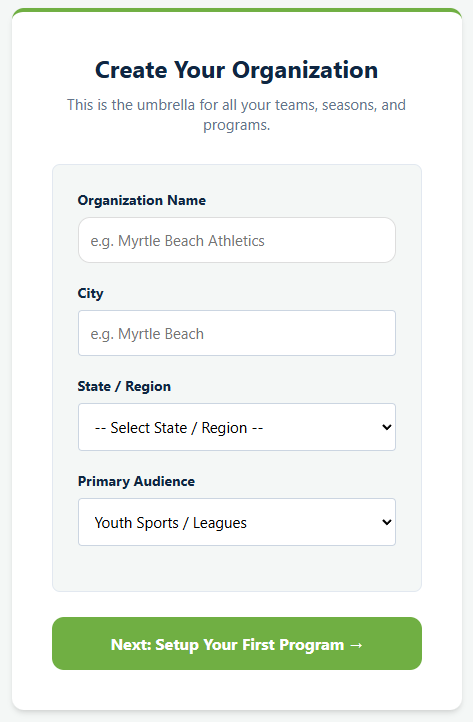
Organization Name is the only required field and it is what families will see, so use the name they would recognize rather than a legal entity name.
City and State / Region are optional and worth filling in anyway, since they are what make your organization identifiable to somebody who knows three clubs with similar names.
Primary Audience offers Youth Sports / Leagues or Adult Sports / Leagues. It sets a sensible default and is not a cage.
The button reads Next: Setup Your First Program, because that is exactly where saving takes you.
Create the program
This is the important one. A program is a season, and it holds the registration fee, the form families fill in, the add-ons, the discount codes, the capacity limit and the age range.
You are asked to pick one of three types, and the choice is permanent, which the page says plainly at the time.
- A Camp / Clinic, for a short event.
- A Single Team, the minimal case for one coach with one roster.
- A League / Season, where players register first and you split them into teams afterward.
The full walkthrough, including fees, capacity and age limits, is in creating a registration program. If you are opening registration rather than just organizing a roster you already have, read that next.
Add your first team
Where teams come from depends on the program type you picked in step 2.
A Single Team or a Camp creates its one team for you automatically, with you already on the roster, so there is nothing to do here at all. A single team takes the program's own name; a camp gets the program name with Hub after it.
A League / Season is the other shape. Players register without knowing their team, land in a holding pool, and you draft them onto teams once you can see who signed up. That is usually the right way round, because you cannot balance teams before you know the numbers.
What to do next, in order
With the three levels in place, the rest follows a fairly reliable sequence. Nothing here is mandatory, and doing them in roughly this order saves rework.
- Build your registration form before you share the link, because editing it after submissions arrive leaves you with answers in two different shapes. See building your registration form.
- Decide how you are taking money. Cards need Stripe connected first; cash, checks and Venmo need nothing. See connecting Stripe.
- Share the registration link. See sharing your registration link.
- Bring in your coaches, using one application link rather than adding everybody by hand. See adding coaches and volunteers.
- Put the schedule in once you know the fields you have. See scheduling a whole season.
If you are not starting from scratch
Coming from a spreadsheet or another product, the order above still holds, with one addition: do not import last season's roster before creating this season's program. Registrations belong to a program, so players brought in without one have nothing to attach to.
For the wider question of what has to be true before any of this, see how to start a youth sports league.
Common questions
What do I create first in Playbook Logix?
Why is there no sport on the organization?
Do I have to create teams before opening registration?
Can I change the program type after creating it?
What should I do before sharing the registration link?
Last updated September 22, 2026.
Ready to run your season on this?
Playbook Logix is free to start, and no credit card is needed.