
Registration & Family Signup
Registration is where most families meet you for the first time. It should take five minutes on a phone, ask only what you actually need, and add up correctly every single time. That's what this is built to do.
A public sign-up page, no account needed to look
Every organization gets its own public page listing the seasons and camps currently open, each with its price and a Register button. You can share that one link anywhere: Facebook, a flyer, an email, a QR code on a gym door.
The important part is that nobody has to create an account to see what you're offering. A parent who clicks your link lands on a real page with real information: what the program is, what it costs, and when it starts. They only create an account at the point they actually sign a child up. And if they aren't logged in when they hit Register, they're walked through signup and then dropped right back where they left off, not sent to a homepage to start again.
You can also skip that page entirely and share a direct link to one specific season. Both work; most organizations use both.

Ask exactly what your program needs
Nobody's registration form is the same. A tackle football league needs helmet and jersey sizes. A travel team needs passport details. A rec league needs a shirt size and a parent's phone number.
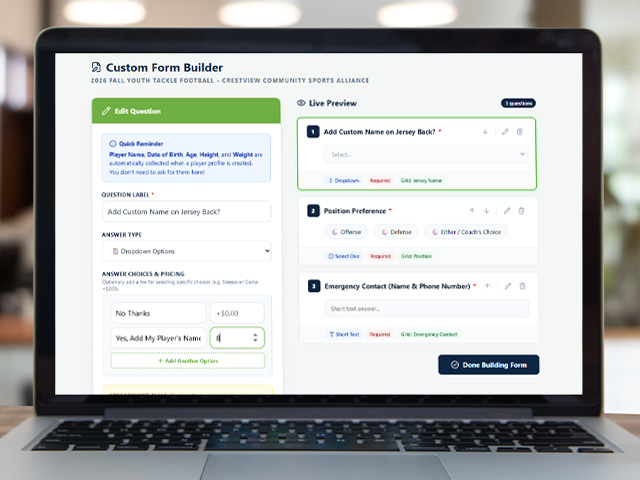
So you build the form yourself, one question at a time, by dragging pieces into place. There are seven kinds of question you can add:
- Short TextA single line: jersey name, emergency contact, school.
- Long TextA paragraph box: medical notes, past experience.
- Date PickerA calendar date: physical exam date, last tetanus shot.
- DropdownPick one from a long list: jersey size, preferred position.
- Select OneRadio buttons when you want every choice visible at once.
- Multi-SelectCheck all that apply, which positions a player can cover.
- AgreementA box a parent has to check: code of conduct, photo permission.
Any answer can carry a price
This is the part most sign-up forms can't do, and it's where a lot of the manual work disappears.
An answer can cost extra
Add "Do you want your player's name on the back of the jersey?" and attach $8 to the Yes option. A parent who picks Yes has $8 added to their total automatically. A parent who picks No doesn't.
You're not maintaining a separate list of who wanted what. The answer and the charge are the same thing.
Mark what's required
Flag any question as required and the form won't submit without it. That's how you stop chasing eleven families in August for the emergency contact they skipped in June.
You can also reorder questions by dragging them, and preview the whole form as a parent will see it before you publish anything.
Rules the form enforces for you
Set these once when you create the program, and you stop policing them by hand for the rest of the season.
Age limits
Set the earliest and latest birth date a player can have. A child outside that window can't complete the form, so a 12-year-old doesn't quietly end up on your 10U roster because a parent guessed.
It's checked on our end, not in the browser, so it isn't something a determined parent can click their way around.
Capacity limits
Cap a program at the number of players you can actually field. Once it's full, it's full, no discovering in week one that you accepted forty kids for thirty spots.
Deadlines & closing
Give a program a registration deadline, or close it by hand the moment you're done taking sign-ups. When the season ends, archive it. It disappears from the public page without deleting any of the records behind it.
Information gets entered once
A parent with three kids should not fill in the same address three times, and should not do it again next season.
Each family keeps a profile with their children saved in it. Registering a second child means picking them from a list, not retyping their birthday and emergency contact. Next season, the same profile is still there. The family selects the child, checks that nothing's changed, and pays.
If a parent starts registering a child who's already signed up for that program, the system catches it before they pay rather than after. That's a small thing that saves a genuinely annoying refund conversation.

When a family checks out, the total (base fee, plus any paid add-ons they chose, minus any discount or promo code) is worked out on our servers, not in the web page on their phone. Anything calculated in a browser can be edited by someone determined enough. Doing it on our side means the amount a family is charged is the amount you set, every time. That total is then frozen onto their invoice, so it doesn't quietly shift later if you change next season's prices.
Once a family registers, they land on a roster: manual add or email invite, for any program type.
Rosters & TeamsPayment plans, promo codes, and the rest of the money tools live on their own page.
Payments & BillingHow to do it
Open registration in minutes, not weeks
Build your first form and publish a program today.