
Payments & Billing Tools
This is money your organization collects from families: deposits, fees, add-ons, dues. Playbook Logix's own bill to you lives on the Pricing page, not here.
The money is yours, and it goes straight to you
This is the question every treasurer asks first, so here's the plain answer: when a parent pays by card, that money lands in your organization's own bank account. It does not sit with us and get paid out later.
Technically, your organization is the merchant on every card payment. We connect your own Stripe account (Stripe being the same payment company behind a great many online checkouts) and the charge runs through it directly. You can see it in your own Stripe dashboard. If you stopped using Playbook Logix tomorrow, that account and its history are still yours.
What it costs: Stripe takes its standard card processing fee, currently 2.9% plus 30¢ per transaction, the same as it would on any website. Playbook Logix adds a flat 99¢ per transaction on top. Not a percentage: 99 cents, whether the registration is $40 or $400. On a $175 football registration that's about $6.13 total, and 99 cents of it is ours.
Who pays those fees is your decision, season by season. Leave the setting on and the fees are added to the family's total at checkout, so your program collects the full amount you set. Switch it off and your organization absorbs them, so a family pays exactly the price you advertised. Some clubs pass them on for registration and absorb them on smaller add-on purchases. You can set it differently for every season you run.
And that 99¢ is the whole of what we take from a payment. There's no percentage cut, no monthly minimum on transactions, and no separate charge for taking the money offline instead. Your Playbook Logix plan is billed separately and is the only other thing you pay us. See Pricing.
Cash, checks and Venmo still count
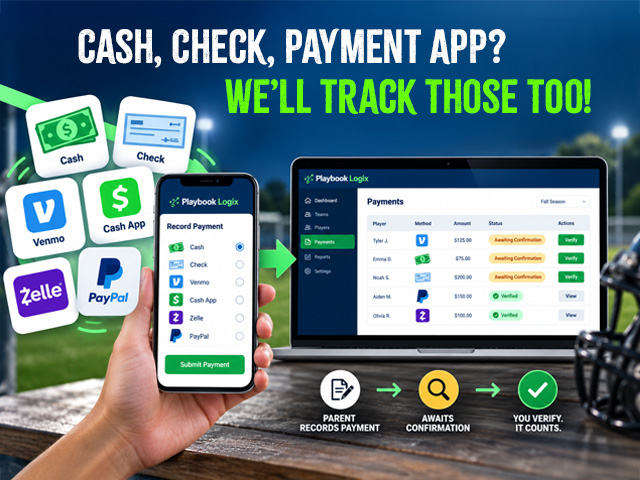
Plenty of youth sports money still moves by cash at practice or a Venmo request on a Tuesday night. Ignoring that would make the balances wrong, so it's built in.
A parent can record that they've paid you another way (Venmo, CashApp, Zelle, PayPal, cash, or a check) and it shows up on your side marked as awaiting confirmation. You check whether it actually arrived, then click Verify. Only then does it count against what they owe.
That two-step exists for a reason. A parent saying they sent a Venmo and the money actually arriving are different events, and a balance that updates on the first one will eventually be wrong. This way, the ledger only moves when someone has confirmed the money is real, and every payment keeps a record of who verified it and when.
Tools for the awkward money conversations
Most of what makes collecting fees painful isn't the collecting. It's the exceptions. A family that can't pay it all in August. The third child. The coach's kid who plays free.
Payment Plans & Deposits Coach+
Set a minimum deposit (say $50 of a $200 fee) and let families pay the rest across the season instead of all at once. Their remaining balance is visible to both of you the whole time.
This is often the difference between a family signing up and quietly not signing up.
Automatic Installments Coach+
Split a fee into a fixed number of scheduled charges (three monthly payments, say) and they run on their own once the family sets it up. No chasing, no reminder texts.
The same mechanism handles ongoing membership dues billed weekly, monthly, or yearly.
Add-ons & Team Store Coach+
Sell extras during registration: a spirit pack, a second jersey, a personalized warm-up. Items can carry options with their own prices, so "Hoodie, Youth M / Adult L" is one item, not four.
Parents pick them at checkout and the total adjusts. No separate order form to reconcile later.
Promo Codes Coach+
Create codes worth either a flat amount ($25 off) or a percentage (15% off). Useful for a sponsor's employees, a returning-player discount, or making good on a rained-out season.
A promo code stacks with a sibling discount, so a family can get both.
Early-Bird & Late Fees Coach+
Set a date before which the price is lower, and a date after which it's higher. The price changes itself when those dates pass. You don't edit anything at midnight.
It's the cleanest way to get families to register early, which is what actually lets you order uniforms on time.
Sponsorships by card
A family can share a link that lets a grandparent, an aunt, or a local business pay part of their balance by card. Without creating an account.
It settles into the same account as every other card payment and comes off the balance immediately. How Sponsor-a-Player works
Sibling Discounts Coach+
Set a discount that applies automatically from a family's second child onward, with separate amounts available for the second, third, and fourth.
Nobody has to remember to apply it, and no parent has to email asking whether you offer one.
What's collected, what's outstanding, who owes it
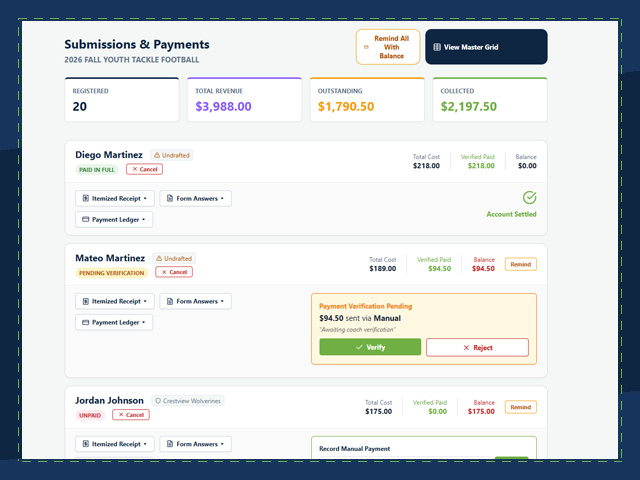
The revenue dashboard answers the three questions a board asks: how much have we taken in, how much is still owed, and by whom.
Every balance is worked out fresh from the payment records each time you look: the invoice total, minus every payment that's been verified against it. Nothing is a stored number that drifted out of date, which is exactly how spreadsheets go wrong.
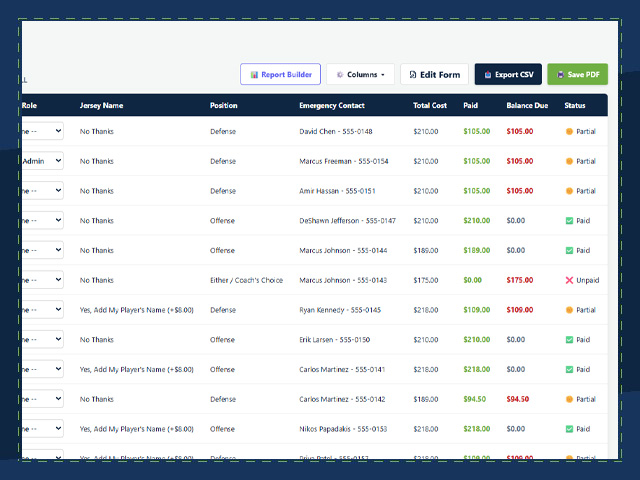
Alongside that sits the Registrant Data Grid, which is the closest thing to a spreadsheet you'll want. Every question you asked on your registration form becomes its own column: jersey size, position, emergency contact, whatever you built. Sort it, filter it, save the filters you use often, and export the whole thing to CSV when the uniform supplier wants a size breakdown.
What organizations ask about payments
Do we need our own Stripe account?
Yes, and that's the point. It's what makes the money yours rather than ours. Setting one up is free and takes a few minutes; Stripe will ask for your organization's details and where to deposit funds. Once it's connected, card payments flow into it directly.
Can we take card payments on the free plan?
Yes. Card checkout works on every plan, including Starter. The Coach plan and above add the tools around it (payment plans, promo codes, early-bird pricing, sibling discounts) not the ability to get paid.
What if we refund a family?
You refund them from your Stripe dashboard as you would any other charge. Stripe's processing fee and our 99¢ are not returned on a refund, so a refunded registration costs the organization those fees. Worth knowing before you set a refund policy.
Does a family's price change if we raise fees next season?
No. When a family checks out, their total is worked out once and locked to that registration. Changing next year's price, adding an add-on, or editing a discount doesn't reach back and alter an invoice somebody already has.
Can a family pay part now and part later without a payment plan?
Yes. Any payment counts against the balance whenever it arrives, by card or recorded as cash or Venmo. A formal payment plan just automates the schedule; partial payments work regardless.
Everything on this page is money the organization collects from families: registration fees, add-ons, dues. The organization's own subscription to Playbook Logix is a separate, much smaller bill, covered on the Pricing page.
How to do it
Stop chasing payments by text
See the full plan comparison, or just get started free.