
Help Center
How to manage your Playbook Logix subscription
What you will learn
- Tell your own bill apart from the money families pay you
- Read the usage counters, and which one usually moves first
- Change plans, and what to do before downgrading
- Know which features are gated and which are on every plan
Learn what your Playbook Logix plan includes, how to see what you are using, how to change plans, and why this bill has nothing to do with the money families pay you.
Seeing where you stand
Open your organization's Billing page. The top shows your current plan and how much of it you are using.
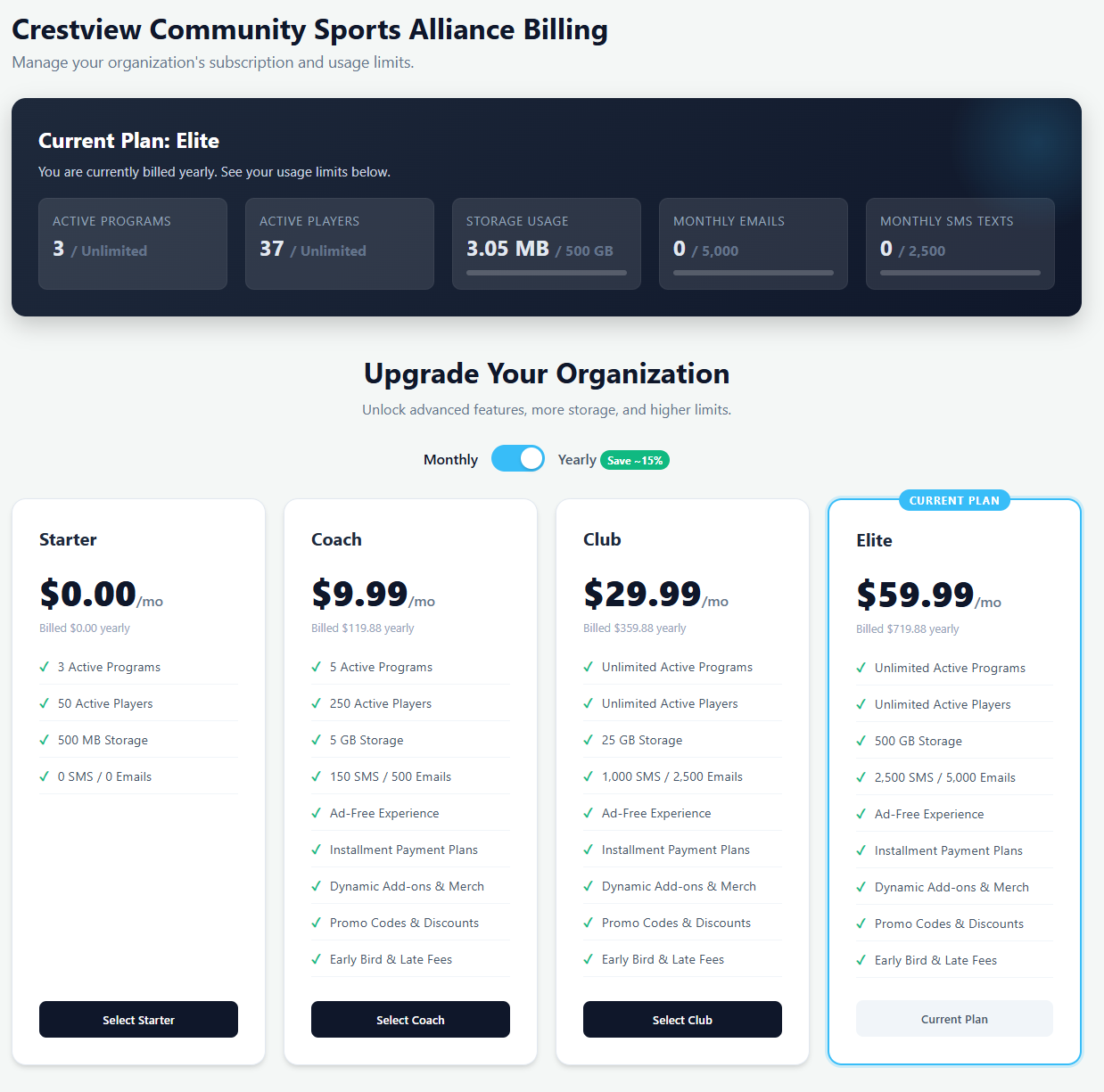
Five counters, and each one can be the reason to move up.
- Active programs, which is seasons running at once, not seasons ever run.
- Active players, the registrations you are currently carrying.
- Storage, used by photos and documents.
- Monthly emails and monthly SMS, which reset each month.
The four plans
Starter is free and stays free: three active programs, fifty players, and no messaging. It carries ads, and it is a genuine plan rather than a trial.
Coach, Club and Elite raise those limits and add the paid features: installment payment plans, add ons, promo codes and discounts, date driven pricing, and no ads. The plan cards list exactly what each one includes.
Paying yearly saves roughly fifteen percent, and the toggle above the cards switches the prices between monthly and the yearly equivalent so you are comparing like with like.
Changing plans
Pick the plan you want and follow the checkout. Upgrading takes effect straight away, so the feature you upgraded for is available before you close the tab.
Downgrading is worth a moment's thought. If you are above the lower plan's limits, being under them again is your job before the change makes sense: archive the seasons that have finished, and the active program count drops on its own.
Which plan a feature needs
When a feature is not on your plan, Playbook Logix shows it marked as locked rather than hiding it, so you can see what is there. The common ones:
- Installment payment plans and auto pay, for families paying a large fee over time.
- Add ons and priced form options, for uniforms and extras.
- Promo codes and sibling discounts.
- Date driven pricing, for early bird and late fees.
- Email and SMS, which the free plan does not include at all.
What does not change with your plan
Registration, teams, rosters, schedules, attendance, the message board and the team hub all work on every plan including the free one. So does taking money: a Starter organization can connect Stripe and collect fees exactly like an Elite one.
The per payment fee is the same on every plan too. See what card payments cost.
Common questions
What is the difference between my plan and registration fees?
Is the free plan a trial?
What usually makes an organization outgrow a plan?
How do I get under the limits so I can downgrade?
Can I take card payments on the free plan?
Last updated September 21, 2026.
Ready to run your season on this?
Playbook Logix is free to start, and no credit card is needed.