Run your season day-to-day, from your phone
The app is for the moments between practices: checking when the game is, seeing what you still owe, catching a message about a field change. Setting up a season still happens on a computer, where it belongs.
What goes on the phone, and what doesn't
Plenty of apps try to cram an entire admin system onto a five-inch screen. This one deliberately doesn't.
On the phone
The things you do standing up: check a schedule, take attendance at the field, read and reply to messages, see what a family owes, sign a waiver, claim a snack slot.
Fast, simple, and free to install. Nobody has to be talked through it.
On a computer
The things you do sitting down: creating a season, building a registration form, setting prices, running the season attendance report, managing your plan.
These need a real screen. Squeezing them onto a phone would make both worse.
Everything a family checks between games
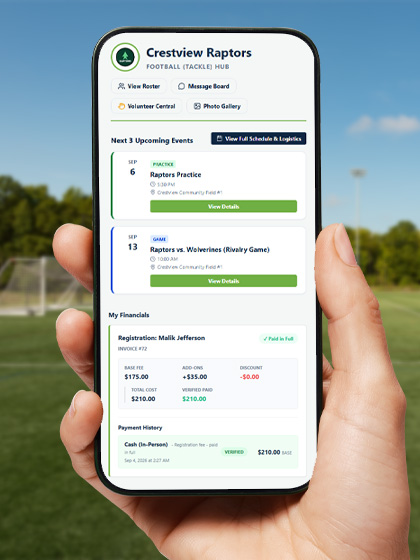
- Family & registrationsEvery child's profile and registration status in one place.
- ScheduleOne unified calendar across every team a family touches.
- Payment statusSee what's owed and what's been paid. Viewing, not purchasing, happens here.
- Documents & messagingWaivers, shared documents, the team message board, and live chat.
Manage the team without opening a laptop
- Roster & schedulingManage your roster and team calendar from the sideline.
- Financial trackingLog an offline payment and verify a pending one on the spot.
- Volunteers & waiversCoordinate volunteer jobs and track waiver compliance.
- Organization & staffManage staff permissions across your organization on the go.

Alerts you'll actually leave switched on
The app can tell you about fourteen different things across a season: a new message, a schedule change, a game reminder the day before, a payment that cleared, a waiver still unsigned, a carpool seat taken, new photos in the gallery. What matters is that you decide which of those are worth a buzz.
Quiet hours
Pick a window (say 9pm to 7am) and nothing buzzes inside it. A coach posting late at night doesn't wake your household.
Turn off just one kind
Don't want carpool alerts but do want schedule changes? Switch off one without going silent on the rest.
Taps take you there
Tapping an alert opens the exact thing it's about: that event, that message, that balance. Not the app's front page for you to go hunting.
Also included: a native share sheet for sending links, and one-tap saving of team photos straight to your camera roll.
Creating an organization or season, and managing your plan, always happens on the web app. That's a deliberate, permanent choice, not a missing feature. It's what lets the mobile app stay simple, fast, and free to install. This page can talk about pricing and getting started freely; the actions themselves just live at app.playbooklogix.com.