
Scheduling & Attendance
Build a season's worth of practices all at once, put every team a family follows on a single calendar, and track who actually showed up, without a clipboard.
True recurring series, not a fake weekly repeat
Say practice is Tuesdays and Thursdays at 5:30, from mid-August to mid-October. You enter that once (the days, the time, the start and end dates) and every one of those practices appears on the calendar. Twenty dates, one setup.
The part that matters comes later, when something changes. Thursday's practice has to move to 6:30 because the field is being re-lined. In a lot of tools you either edit that one date and break its link to the series, or you edit the series and accidentally move every Thursday for the rest of the season.
Here you're asked which you meant: just this one, or this one and every future one. Moving a single rained-out practice doesn't quietly rewrite November, and moving the whole series doesn't require touching twenty dates by hand.
Everything a family needs, in one place
Saved locations, with a map
Save each field, gym, or facility once: name, address, and any notes like "park behind the concession stand." After that you pick it from a list instead of retyping it.
Families get an actual map on the event, so nobody has to text a coach asking which entrance to use at a field they've never been to.
One calendar per person, not per team
A parent with three kids on three teams sees one combined calendar, not three to check separately. A coach who also has a child playing sees both.
It pulls in every team you're connected to (coaching, playing, or as a parent) so there's a single place to answer "are we free Saturday?"
RSVPs before the event
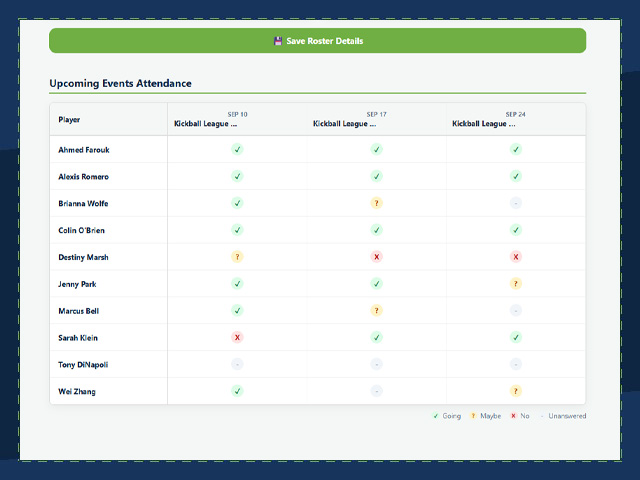
Families mark Going, Maybe, or Not Going ahead of time, so you know roughly how many players to expect before you plan a scrimmage around fourteen kids.
That's separate from attendance. One is a plan, the other is what actually happened.
Who actually showed up
At the field, you mark each player present or absent. It takes a few seconds on a phone, and it works on the mobile app so you're not doing it later from memory.
Over a season that adds up to something genuinely useful: a grid of every player against every event, with each player's attendance percentage and the team's overall figure. That's the report you want when a parent asks why their child isn't starting, when a league requires a participation minimum, or when you're deciding who gets the effort award.
It only counts events that have already happened, so an upcoming game doesn't show as a column of absences for a practice nobody has been to yet.

An event is more than a date and a time
Each one carries the logistics that go with it, so the details live where people look for them.
Event types
Practice, Game, Tournament, Meeting, or your own label, color-coded on the calendar so a game stands out from a practice at a glance.
Snack duty
One family claims it per event, with a note for what they're bringing or an allergy warning.
Carpools
Parents offer rides with a real seat count, and others claim a seat for a named player.
Volunteer jobs
Scoreboard, gate, photographer, posted with the number of people needed and claimed by approved volunteers.
Marking a player present or absent works fine on a phone, and that's the part you do at the field. The season-long report is a wide grid (every player down one side, every event across the top) and a grid like that is genuinely unpleasant to read on a phone screen. So it lives on the web, where there's room for it. That's a deliberate choice, not a missing mobile feature.