
Help Center
How to schedule a whole season at once
What you will learn
- Create every practice for a season in one pass
- Give each date its own title and location before saving
- Drop the weeks that fall on holidays
- Change one event later, or every future one, without touching the past
Takes a couple of minutes for a season.
Learn how to create every practice for a season in one pass, change individual dates before anything is saved, and edit one event or the whole series afterward.
Practices on Tuesdays and Thursdays from September to November is twenty something events. You do not add them one at a time.
Before you start
- A team with a roster
- Your start and end dates, and which nights you practice
- Your saved locations. See adding a practice or game
Turn on recurring
Start the way you would for a single event, then check Make this a recurring event. Two more fields appear.
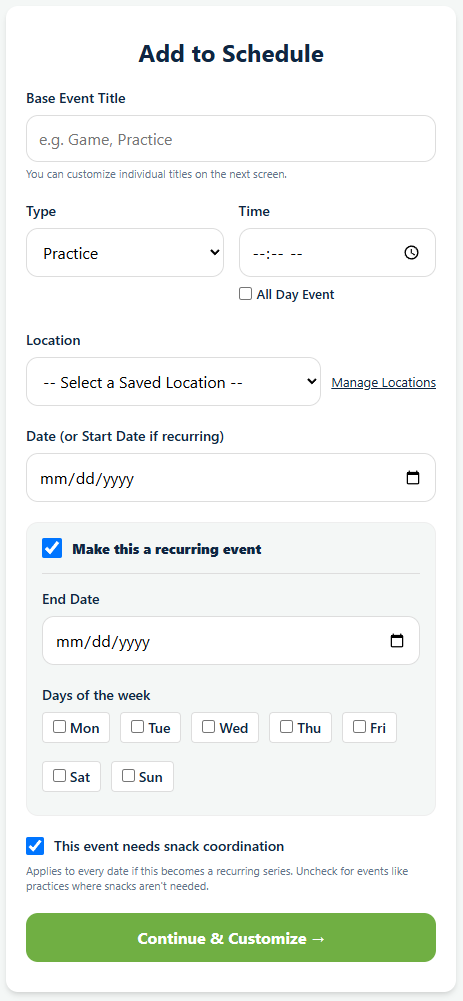
- End Date is when the series stops. The date you set further up becomes the start.
- Days of the week is where you check Tue and Thu, or whatever your pattern is. Check several and you get all of them.
The title, type, time and snack setting you chose apply to every date in the series. You are about to get a chance to override any of them.
Customize before you save
Continue & Customize works out every date that matches and lists them. Nothing has been saved yet.
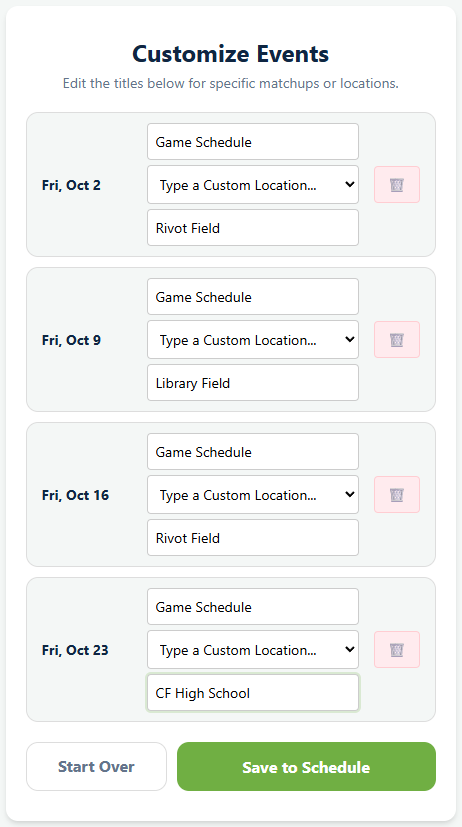
This screen is the reason the feature is worth using. On each date you can:
- Change the title, so a game series becomes "vs Northside", "vs Lakeside" and so on rather than twelve identical rows.
- Change the location, for the week you are at the high school instead of your usual field.
- Delete the date, for the Thursday that falls on Thanksgiving.
Save to Schedule creates them all. Start Over throws the lot away and returns you to the form, which is what you want when you realize you checked Wednesday instead of Thursday.
What a series gives you later
The events are linked rather than being twenty separate rows that happen to look alike. When you edit one, Playbook Logix asks whether you mean this event only or this and all future events in the series.
That is what makes the mid season change survivable. Practice moves from 5:30 to 6:00 from October onward: open the first October practice, change the time, choose this and all future, and the rest follow. The practices already played keep the time they actually happened at, which is what you want when you look back at attendance.
A shape that works for most seasons
Build the practices as one recurring series, because they are genuinely the same event repeating. Build the games as a second series if they are on a fixed night, then rename each one on the customize screen as the fixtures come in.
If your games are not on a regular night, add them individually. A series of one is not worth the setup.
What happens next
A full calendar is only useful if families look at it. See what families see, and RSVPs and attendance for finding out who is actually coming.
And once the calendar exists, most events need somebody to run the scoreboard or bring the snacks. See snacks and carpools, or how to build a practice schedule if you are still working out the shape of the week.
Common questions
How do I create a whole season of practices at once?
Can I skip a week for a school holiday?
Can each event in a series have a different title?
If I change one practice, does it change them all?
What if I set the series up wrong?
Last updated November 8, 2026.
Ready to run your season on this?
Playbook Logix is free to start, and no credit card is needed.