
Communication & Notifications
Three different jobs, three different tools: a board for things that need a record, a chat for quick back-and-forth, and email or text for when something genuinely can't wait.
For anything you'd hate to have buried
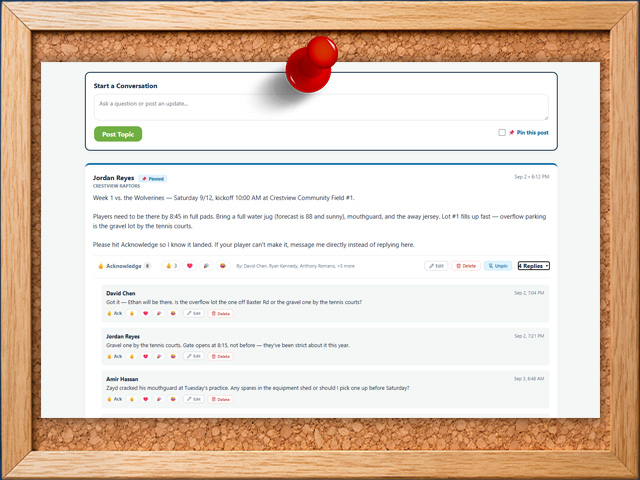
This is where the things that matter go: the tournament schedule, the uniform order deadline, the change of field for Saturday. Each post is its own conversation, so replies stay attached to the thing they're about instead of scrolling away.
Coaches can pin a post so it stays at the top all season, a rule most teams end up using for the schedule or the team rules. People can react with an emoji when a reply isn't needed, which cuts down the fourteen "thanks!" messages that bury the actual information.
The genuinely useful part is the Acknowledge button. Post that practice moved to 6:30, and each parent taps to confirm they've seen it. You get a list of who has and who hasn't, so instead of hoping forty people read a group text, you can message the four who didn't.
Picking the right one
Using a group text for all three is exactly why group texts stop working.
Message board
For things with a shelf life. Schedules, deadlines, tournament details, anything you'll want to point someone back to in three weeks.
Threaded, pinnable, and you can see who has read it.
Live chat
For the quick stuff. "Running ten minutes late," "anyone have a spare mouthguard," the ordinary chatter of a team.
Separate channels keep it out of the way of the board, so casual conversation doesn't bury a deadline.
Email & text blasts
For when it can't wait. Lightning delay, game canceled, bus leaving early, the messages that need to reach a phone right now.
Send to a whole team or the entire organization at once. Each plan includes a monthly allowance of emails and texts; see Pricing for the numbers.
Why people don't mute this app
Most team apps get muted within a couple of weeks, and once someone mutes it you've lost them for the season. So the notification side is built around not wearing people out.
People choose what they hear about. Notifications are grouped by kind (events, messages, payments, waivers, roster changes, volunteer jobs, carpools, announcements) and each person switches on only the ones they want. A parent who doesn't drive can turn off carpool alerts without going silent on schedule changes.
Quiet hours are respected. Set a window (say 9pm to 7am) and nothing buzzes a phone inside it. A coach posting at eleven at night doesn't wake up forty households.
Bursts get combined. If several notifications of the same kind stack up for one person, they arrive as a single alert rather than six in a row. This is the difference between a useful app and one that gets silenced.
Some run themselves. Event reminders go out roughly a day ahead, and families with an unsigned waiver get a nudge, without anyone remembering to send either.
Opt-ins are honored, not assumed
Email and text are separate choices
Everyone controls whether they'll accept email, texts, or both. A blast only goes to people who agreed to that channel, so you're not texting a parent who never opted in to texts.
That's both good manners and how you stay on the right side of messaging rules.
Nothing is a dead end
A notification links straight to the thing it's about. Tapping a payment reminder opens that balance; tapping a schedule change opens that event. Nobody has to hunt for what you meant.
Pinned Announcements Coach+
A persistent banner, scoped to the whole organization, a program, or a single team.
Automated To-Do Lists Coach+
Recurring tasks that generate themselves so nothing falls through the cracks.
RSVP
Going, Maybe, or Not Going, tracked per event, right alongside the calendar.
How to do it
Say it once, let the system handle the rest
Set up your team's message board today.