
Help Center
How to use the team message board
What you will learn
- Start a topic and keep replies threaded
- Pin the one post that matters this week
- Use acknowledgements as a read receipt
- Tell reactions and acknowledgements apart
Takes about 5 minutes.
Learn how to use a team message board in Playbook Logix: starting a conversation, pinning the post everybody needs, and using acknowledgements to see who has actually read it.
The message board is the team's noticeboard. It sits under Posts on the team, beside Chat, and it is where anything worth keeping goes.
Before you start
- A team with families on its roster
Starting a conversation
Write in the Start a Conversation box and click Post Topic. Everyone on the team can post, not only coaches, which is what makes it a board rather than an announcement feed.

Replies thread under the topic, so a question about the team meal and a change to Thursday practice stay separate instead of turning into one scrolling conversation.
Pinning
Pin this post holds a topic at the top of the board. You can pin as you post or pin an existing topic afterward, and unpin it when it stops mattering.
Acknowledgements, which are the useful part
Every topic carries an Acknowledge button. A parent taps it, it becomes Acknowledged, and the post shows a count and the names of who has.
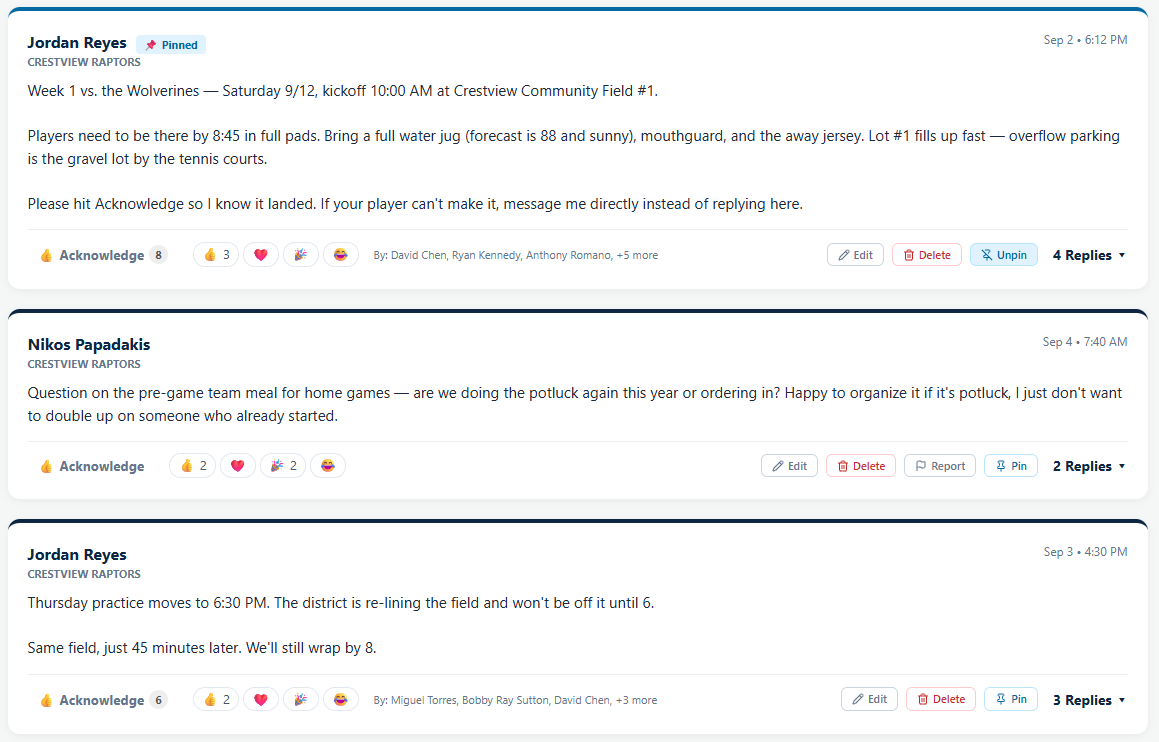
This is the feature worth changing your habits for. "Did everybody see that practice moved?" is normally unanswerable, and here it is a number with names attached. You can see exactly which three families have not read it and text those three rather than the whole team.
Reactions
Posts also take emoji reactions. They are not the same as an acknowledgement and should not be treated as one: a thumbs up means somebody saw it and felt like reacting, while an acknowledgement is the thing you can count on.
They are still worth having. A board where nobody can respond except by writing a reply is a board that fills up with "thanks" and "got it".
Editing, deleting and reporting
You can edit or delete your own posts. Coaches and administrators can remove anything on their team's board.
Everyone else gets Report, which sends the post to whoever runs the organization rather than to you. See handling a reported message.
Posts, chat, or an email
Use the board for anything that should still be findable next week: the game details, the uniform order, the tournament information. It is the only one of the three that works as a record.
Use chat for back and forth between a few people. Use email or a text when it has to reach people who are not going to open the app today.
Common questions
Who can post on the team message board?
What does Acknowledge do?
How do I get parents to actually acknowledge?
Is a reaction the same as an acknowledgement?
How many posts should I pin?
Last updated September 21, 2026.
Ready to run your season on this?
Playbook Logix is free to start, and no credit card is needed.