
Help Center
How to handle a reported message
What you will learn
- Read a report card and get the whole picture from it
- Choose between removing content and dismissing the report
- Understand why some reports never reach you
- Know which category stops being a moderation decision
Takes about 2 minutes per report.
Learn how to review content somebody reported in Playbook Logix, why a report naming the person in charge goes somewhere else, and how to decide between removing something and letting it stand.
Anybody can report a message board post, a chat message or a photo. The report goes to whoever runs the organization, and lands in Reported content.
Before you start
- An organization you own or administer
What the queue shows you
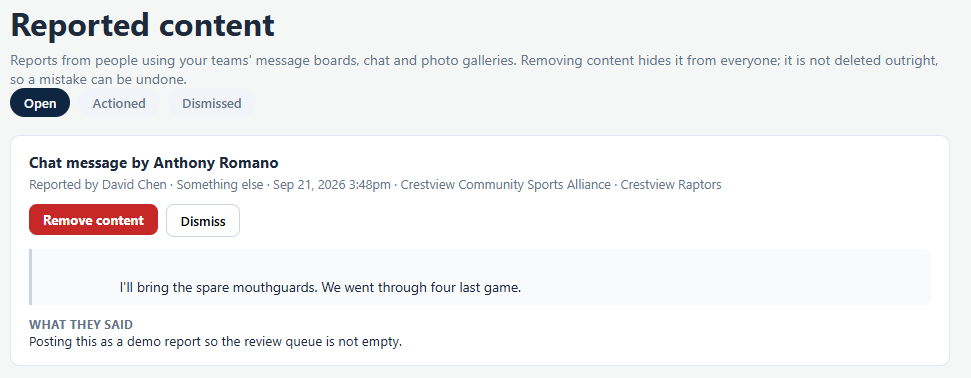
Each card carries the whole picture, so you are not chasing context.
- Who wrote it and what kind of content it was.
- Who reported it, when, and which organization and team it came from.
- Why, from a fixed list: harassment or bullying, hate speech, nudity or sexual content, violence or threats, endangers a child, spam or scam, or something else.
- The content itself, quoted, plus anything the reporter typed under What they said.
Three tabs separate Open from Actioned and Dismissed, so a decision you already made stops asking for your attention.
Your two choices
Remove content hides it from everyone. Dismiss closes the report and leaves it up.
Why a report might not reach you
A report about the person who would otherwise review it is the case that breaks every moderation system, and Playbook Logix handles it rather than hoping.
When the reported person owns the organization or is one of its administrators, the report is escalated: it leaves the organization entirely and goes to Playbook Logix. Nobody inside the club sees it, because everybody inside the club either is that person or answers to them.
So a quiet queue does not always mean nothing was reported. If you are an organization administrator and somebody tells you they reported something you cannot find, the likely explanation is that the report named an owner or an administrator and has gone above you.
Deciding
Most reports in youth sports are not abuse. They are a heated exchange about playing time, a joke that read badly in text, or a parent who is upset with another parent. A few genuinely are not, and telling them apart is the job.
Remove it when it names or targets a child, contains a threat, or would clearly harm somebody if it stayed up for another hour. Do not deliberate on those.
Dismiss it when the content is fine and the disagreement is not really about the post. Dismissing is not taking a side, it is saying this particular message does not need removing.
Follow up separately either way. The report queue closes a report; it does not resolve what caused it. Two parents arguing in public on a team board is a conversation somebody needs to have offline, and no button in any software does that part.
Blocking
Separately from reporting, a person can block another person, which is their own decision and does not need you. Reporting asks you to act; blocking is somebody looking after themselves.
Anything about a child goes further than this screen
Where reports come from
Reports are raised against posts and messages, so it helps to know how both of those work. See the team message board and team chat.
Most moderation problems are prevented rather than handled. Setting expectations early is the cheapest version of this whole job. See how to communicate with sports parents.
Common questions
Who sees a report?
What happens if somebody reports an organization admin?
Does removing content delete it?
Someone said they reported a post and I cannot see it. Why?
What should I do about a report that endangers a child?
Last updated September 21, 2026.
Ready to run your season on this?
Playbook Logix is free to start, and no credit card is needed.