
Help Center
How to accept cash, checks and Venmo
What you will learn
- Set up Venmo, Cash App, Zelle, PayPal, cash and checks
- Understand why these are organization settings, not program ones
- Follow a claimed payment from pending to verified
- Keep the manual work down to something sustainable
Takes a couple of minutes to set up.
Learn how to take registration money by cash, check, Venmo, Cash App, Zelle or PayPal in Playbook Logix, and how to keep your outstanding balances trustworthy when the money does not arrive through the system.
Plenty of youth sports money still moves by check and by Venmo, and there is nothing wrong with that. None of it carries a Playbook Logix fee, because none of it passes through us.
Before you start
- The handles for whichever services you want to accept
- Ideally an account owned by the organization rather than a person
Fill in your handles
Open Organization Settings and find Accepted Payment Methods.
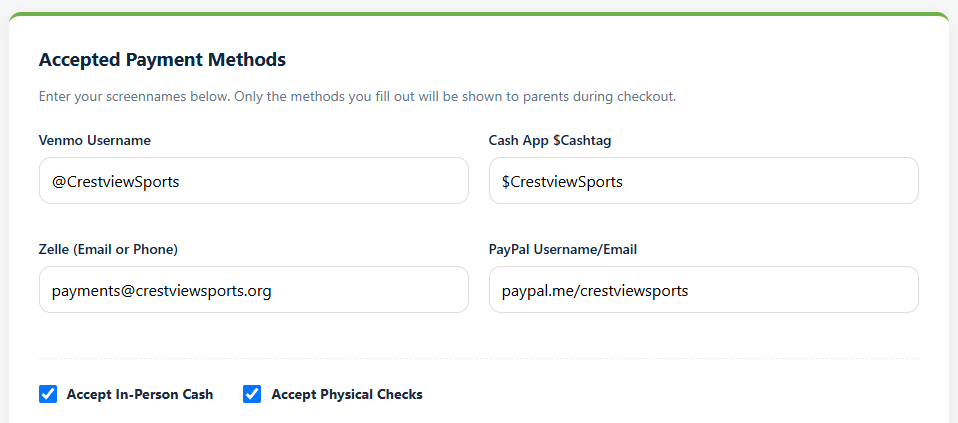
Four handles and two checkboxes. The page states the rule plainly: only the methods you fill out are shown to parents during checkout, so leaving a field empty is how you decline that method.
- Venmo Username, with the @.
- Cash App $Cashtag, with the dollar sign.
- Zelle, as the email address or phone number attached to your account.
- PayPal, as a username or a paypal.me link.
- Accept In-Person Cash and Accept Physical Checks, which are simply on or off.
A parent pays, then tells you
At checkout a family picks one of your methods, sends the money outside Playbook Logix, and records that they have done it. The payment appears on your submissions screen as Payment Verification Pending.
Nothing has moved on their balance yet. It is a claim, not a payment.
You verify it
Check the money actually arrived, then press Verify. The balance moves at that moment. Reject puts it back if it never showed up.
For the full workflow, including recording a check somebody hands you at practice, see managing registrations and payments.
Making it less work
The honest downside of offline payment is that every one of them is a small manual job. Three habits keep it manageable.
- Ask families to put the player's name in the note. A Venmo payment that says "soccer" from an account called @mike_h_1987 is ten minutes of detective work.
- Verify in batches. Once a week with the bank app open beats doing it as each notification arrives.
- Collect checks at one event, with a table and a person. The same advice as equipment: a check handed to a coach in a parking lot is a check nobody records.
When a family cannot pay at all
Some families are not choosing a payment method, they are quietly unable to afford the season. Sponsorship lets somebody else pay down a specific player's balance, and it can be used discreetly for exactly that. See letting somebody sponsor a player.
Offering cards as well
Most organizations end up offering both. Card payments reconcile themselves and cost a fee; offline payments are free and cost your time. Families differ, and letting them choose removes a reason not to register.
See connecting Stripe and what card payments cost.
Common questions
How do I let parents pay by Venmo?
Are these settings per program or per organization?
Do offline payments cost anything?
What happens when a parent says they paid?
How do I stop Venmo payments being unidentifiable?
Last updated November 3, 2026.
Ready to run your season on this?
Playbook Logix is free to start, and no credit card is needed.