
Help Center
How to set registration fees and payment plans
What you will learn
- Set the base fee, and know why changing it later moves nothing
- Add optional extras like uniforms and team meals
- Take a deposit, or bill the balance automatically through Stripe
- Price by date, so early signups pay less and late ones pay more
- Decide who absorbs the card processing fee
Takes about 10 minutes.
Learn how to price a youth sports program in Playbook Logix: the base fee, optional add ons like uniforms and team meals, deposits and payment plans, early bird and late pricing, and who absorbs the card processing fee.
Program settings holds what you chose when you created the program, so you change those in the same place you set them. For everything else, open the program on your dashboard and click Add-ons & Discounts.
Before you start
- A program already created. See creating a registration program
- What the season actually costs you to run, per player
- Prices for anything you order in bulk, like uniforms
- The dates your early bird window and your late fee should start
The base fee
The base fee is what every player pays before anything is added or taken off. It is set when you create the program and changed afterward in program settings.
Changing the fee does not change what anyone already owes. Registration in Playbook Logix works like an invoice: the total is worked out once, when the family registers, and then frozen. If you raise the fee in March, the families who signed up in January still owe what they agreed to. This is deliberate, and it is why your outstanding balances stay trustworthy.
A program can have no fee at all. Add ons still work on a free program, but date driven pricing, sibling discounts and promo codes do not, because there is no base fee to take anything off.
Add ons
An add on is an optional extra the family can choose during registration. Uniforms, a team meal, a photo package, a second practice jersey.
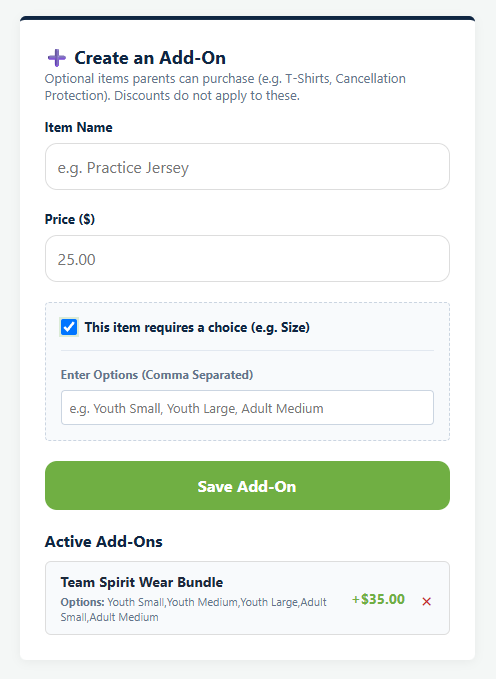
On the Add-ons & Discounts screen, under Create an Add-On, give it an Item Name and a Price. If it comes in sizes or variations, check This item requires a choice and fill in Enter Options (Comma Separated), for example Youth Small, Youth Medium, Youth Large, Adult Small, Adult Medium. The parent picks one at checkout and you get the choice on the registration. Saved add ons are listed underneath as Active Add-Ons, with a cross beside each one to remove it.
There is a second way to charge for something, and it is often the better one. A question on your registration form can carry a price on each choice, so a sleepover week or a specially ordered jersey size adds to the total without needing a separate add on. See building your registration form. Use an add on when the extra is a thing the family buys, and a priced choice when it is an answer to a question you were asking anyway.
Deposits and payment plans
These sit in program settings rather than on the pricing screen, because they change how the whole fee is collected rather than what it is.
Manual Payment Plan takes a Minimum Deposit Required Today and lets the family log back in to pay the rest. The remainder becomes an outstanding balance you can chase from the submissions screen.
Auto-Pay Subscription goes further and bills the remainder automatically through Stripe. Choose the Billing Frequency and the Number of Installments, and the family is charged on a schedule rather than being sent reminders.
Deposits suit a league where families pay when they can. Auto-pay suits a higher fee where the whole amount is genuinely off putting. Both beat the alternative, which is a family who does not register at all.
Either plan also gives you Require Add-ons & Form Options to be paid upfront. Turn it on for anything you order in bulk, so a uniform is paid for before you place the order rather than spread across installments that run past the deadline.
Early bird and late pricing
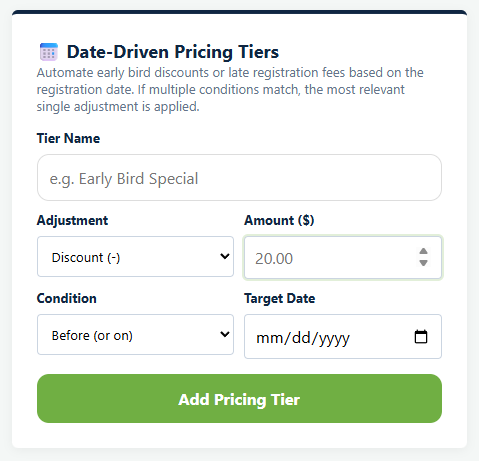
Date-Driven Pricing Tiers, on the Add-ons & Discounts screen, change the price automatically on a date you set. Give the tier a Tier Name, choose whether the Adjustment is a discount or a fee, set the Amount, then set the Condition and Target Date.
Two tiers cover most seasons. An early bird discount before a date, to pull registrations forward so you know your numbers. A late fee after a date, to stop the trickle of signups that arrive once you have already ordered uniforms and built the schedule.
The tier is applied at the moment the family registers, and then frozen with the rest of their invoice. A family who registered during the early bird window keeps that price even if they pay the balance months later.
Who pays the card processing fee
Card payments carry a processing fee. Who pays the Credit Card processing fee? decides whether it comes out of your registration fee or is added to the family's total. The page shows you the arithmetic while you choose: 2.9% plus $0.30 goes to Stripe and there is a $0.99 Playbook Logix fee, so a $100 payment carries $4.32.
There is no universally right answer. Passing it on keeps your program revenue predictable, which matters when the fee is set to cover known costs. Absorbing it keeps the advertised price the price, which matters when families are comparing you to the league in the next town. Pick one and be consistent across programs.
Putting it together
The order Playbook Logix works in is: base fee, plus or minus any date driven tier, then discounts come off that, and add ons are added on top. Add ons sit outside the discount on purpose, because they are usually something you bought at cost. A 20% code on a $100 season with a $35 jersey takes $20, not $27. That total becomes the amount due and does not move afterward. Every payment, whether it is a card charge, a check or a cash handover, is recorded against it, and the balance is the difference.
Next: promo codes and sibling discounts, which are the two discounts that are not driven by a date.
Common questions
If I change the price, does it affect families who already registered?
Can a family pay in installments?
Should I use an add on or a priced form question?
How do early bird prices work?
Should I pass the card fee to parents?
Last updated September 21, 2026.
Ready to run your season on this?
Playbook Logix is free to start, and no credit card is needed.