
Help Center
How to set up sibling discounts and promo codes
What you will learn
- Set a sibling discount, and know which child it starts on
- Understand why a sibling discount sometimes does not apply
- Create promo codes for coaches, hardship rates and partner clubs
- Decide whether a code stacks with the sibling discount
- Set a code value that survives being shared in a group chat
Takes about 10 minutes.
Learn how to set up a sibling discount and promo codes for a youth sports program in Playbook Logix, how the two interact, and how to keep a discount from quietly costing you more than you meant.
Both live on the Add-ons & Discounts screen. Open the program on your dashboard and click Add-ons & Discounts. The base fee itself is not here, it is in program settings. See setting registration fees.
Discounts need a fee to come off. On a program with no registration fee neither of these is available, though add ons still work.
Before you start
- A program with a registration fee. Discounts need something to come off
- A decision on what a second child should pay
- A list of who genuinely needs a code, and what each one is worth to you
Sibling discounts
A family with three children in your league is paying three registration fees, and they notice. A sibling discount is the most common reason a youth sports organization discounts anything at all.
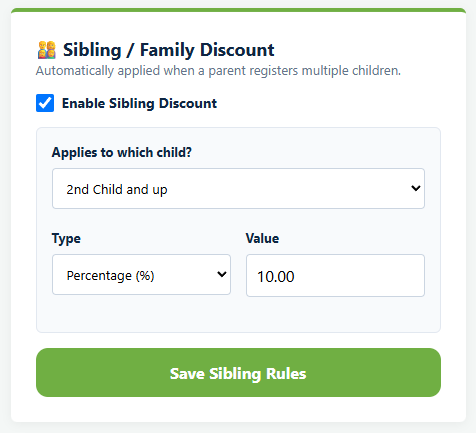
Under Sibling / Family Discount, check Enable Sibling Discount and set three things.
- Applies to which child? is where the discount starts: 2nd child and up, 3rd child and up, or 4th child and up. Every option is "and up", so there is no way to discount only the second child and then charge full price for the third.
- Type is a flat amount or a percentage. Flat is the default.
- Value is the number.
Then click Save Sibling Rules.
How Playbook Logix decides who is the second child
It counts the children already registered for this program under the same parent account, and the next one is the second. That means a parent registering three children in one sitting gets it applied without asking, and so does a parent who comes back three weeks later for the third. Cancelled registrations do not count toward the number.
Percentage or flat amount
A percentage scales with your fee, so it keeps meaning the same thing when you raise prices next season. A flat amount is easier for a family to understand and easier for you to budget, because you know exactly what a three child family costs you.
If your fee is low, a percentage can end up looking insulting. Ten percent off a sixty dollar kickball program is six dollars. A flat ten dollars reads better and costs you about the same.
A percentage is worked out on the registration fee, including any early bird or late adjustment, and never on add ons. A 20% sibling discount on a $100 season with a $35 jersey takes $20, not $27. The family still pays for the jersey, which is usually the point: an add on is something you bought at cost, and discounting it costs your program real money.
Promo codes
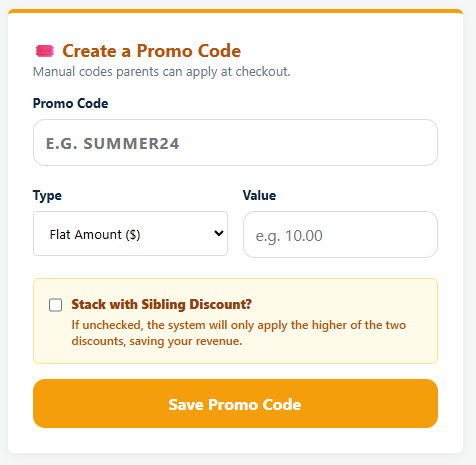
A promo code is a discount a family has to type in at checkout. Under Create a Promo Code, set the Promo Code itself, the Type and the Value, then click Save Promo Code.
Codes are tidied up as they are saved. Everything is forced to capitals and anything that is not a letter or a number is stripped out, so coach-26 and Coach 26 both become COACH26. Case does not matter to the parent typing it either. Worth knowing if you print a code on a flyer with a hyphen in it, because the hyphen is not part of the code.
Codes are worth having for a few specific jobs:
- A board member, coach or volunteer who registers their own child free or at a reduced rate
- A hardship rate you would rather not advertise on the registration page
- A partner club, school or sponsor whose families get a rate
- Fixing a mistake, when somebody was quoted a price you want to honor
Saved codes appear underneath as Active Promo Codes, and you can delete one at any time. Deleting it stops anybody else using it and changes nothing for the families who already did.
There is no usage limit, so set the value carefully
That is the whole of the control you have, and it is worth designing around rather than working against.
So assume any code you give one family ends up in a group chat. That is not a reason to avoid codes, it is a reason to think about the value. A code worth ten dollars that spreads is an annoyance. A code that makes registration free is a problem, and the way to limit the damage is to create it, tell the one family, and delete it once they have registered.
Name codes so you can tell later what they were for. COACH26 and STJOHNS tell you something in November. SAVE20 does not.
When a family qualifies for both
Every promo code carries a Stack with Sibling Discount? checkbox, and it is unchecked when you create one. Leave it unchecked and a family who qualifies for both gets only the larger of the two. Check it and they get both.
When they do stack, the two are worked out separately from the same figure rather than one after the other, so two 20% discounts take 40% off, not 36%. That is worth knowing before you tick the box, because the intuition most people have is the other one.
The simulator on the pricing screen will show you the answer for any combination, and it is quicker than doing the arithmetic. The case worth checking is the board member with three children holding a free registration code, which can come to nothing owed across three players whether or not stacking is on, because a code that covers the whole fee covers it on its own.
Discounts are frozen at registration
Like the rest of the price, a discount is applied when the family registers and then fixed. Adding a promo code in March does not retroactively help the family who registered in January, and deleting a code does not take money back from anyone who already used it.
If you need to adjust what somebody owes after the fact, do it from the submissions screen rather than by changing the discount. See managing registrations and payments.
A note on giving discounts at all
Every discount is money your program does not have, and youth sports budgets are usually tight enough that it shows. The two that consistently earn their cost are the sibling discount, because it keeps families with several children from dropping a child, and a quiet hardship rate, because a child who cannot afford to play is the thing most organizations actually exist to prevent.
Common questions
How does Playbook Logix know which child is the second one?
Why did a family not get their sibling discount?
Can a family use a promo code and a sibling discount together?
Can I limit how many times a promo code is used?
Does adding a discount help families who already registered?
Should the sibling discount be a percentage or a flat amount?
Last updated September 21, 2026.
Ready to run your season on this?
Playbook Logix is free to start, and no credit card is needed.