
Help Center
How to create a team
What you will learn
- Create a team and link it to the right season
- Understand what a team inherits from its program
- Name teams so they are still clear three seasons from now
- Create several teams at once instead of one at a time
Takes about 2 minutes.
Learn how to create a team in Playbook Logix, what it inherits from the program it sits in, and what you get the moment it exists.
A team always belongs to a program. That is not a rule you can work around, and it is the thing worth understanding before you start: the program is the season, and teams are how you divide the people who registered for it. If you have not created a program yet, do that first. See creating a registration program, or setting up your first season if you are starting from nothing.
Before you start
- A program already created. See creating a registration program
- Your list of team names, or at least how many you need
Open the team form
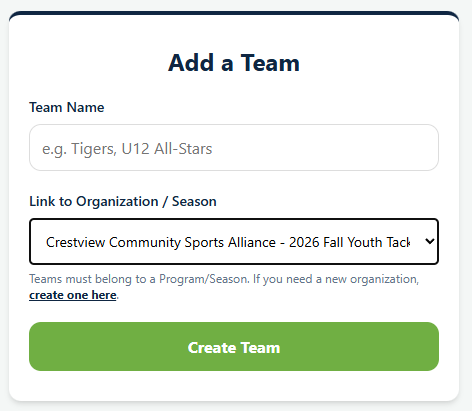
From your dashboard, click Add a Team. There are only two fields, and one of them is a dropdown.
Name it
Team Name is what parents, players and coaches will see everywhere: on the schedule, on the roster, in emails and on the team hub. Write it the way people at the field will say it.
Two habits worth picking up now rather than in November. Put the age group in the name if you run several, because "Tigers" and "U12 Tigers" are the same amount of typing and only one of them is unambiguous when you have four Tigers across three seasons. And avoid putting the year in unless you genuinely reuse names across seasons, because the program already carries the year.
Link it to a season
Link to Organization / Season is the dropdown, and it lists every program you can add a team to, each one labeled with the organization it belongs to. Pick the season this team plays in.
You do not pick a sport. The team inherits it from the program, because the sport lives on the season rather than on the organization. That is what lets one club run baseball in the spring and basketball in the winter without either one fighting the other.
What happens when you click Create Team
Three things, and one of them surprises people.
- The team appears under its program on your dashboard, with its own team hub and an empty roster.
- It picks up the program's sport and organization automatically.
- You are added to it as a coach. Playbook Logix assumes the person creating a team is on it, which is right most of the time and easy to undo when it is not.
Creating several teams at once
You do not have to come back here for every team. When you create a program of the League / Season type, there is a Teams (Optional) box where you can list them one per line, and they are all created with the program.
For a Single Team program or a Camp / Clinic, you do not need this page at all. Playbook Logix creates the one team hub for you, because there is only one place anybody could go.
What happens next
An empty team is not much use, so the next step is putting people on it. Registered players are assigned from the Master Data Grid, which is not where most people look first. See drafting players onto teams.
Common questions
Do I have to create the program before the team?
Can I move a team to a different season?
Why can I not choose the sport?
Why am I on the roster of a team I only created?
How many teams can one program have?
Last updated September 22, 2026.
Ready to run your season on this?
Playbook Logix is free to start, and no credit card is needed.