
Help Center
What team staff can see and do
What you will learn
- What each of the six team permissions unlocks
- Why none of them reach the money
- A sensible starting set for an assistant coach or a team parent
- How team permissions differ from making somebody a team admin
A reference for the six permissions you can give a coach or volunteer on a team in Playbook Logix, what each one actually unlocks, and a sensible set to start an assistant coach on.
Being on a team as staff does not by itself let somebody do anything. Every permission starts off, and you turn on the ones that person needs. Open the team roster, find their card, and click the key icon.
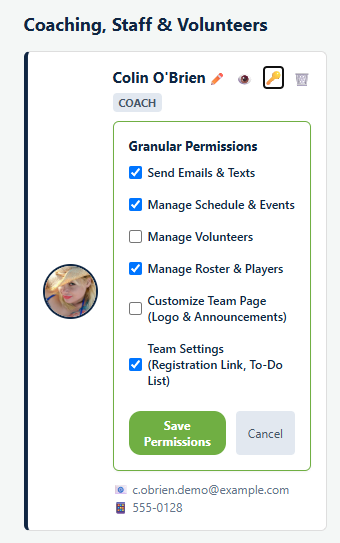
The six permissions
Send Emails & Texts
Lets them message the team's families. This is the one most assistant coaches actually need, because "practice is cancelled" is time critical and routing it through you defeats the point.
It covers texts as well as emails, so it is worth knowing that giving it away spends your organization's monthly message allowance.
Manage Schedule & Events
Lets them add, move and cancel games, practices and other events. Give it to whoever actually sets the practice schedule, which in a lot of leagues is not the head coach.
Manage Volunteers
Lets them run the volunteer jobs for this team: creating jobs, seeing who signed up, chasing the gaps. This is a team parent's permission far more often than a coach's.
Manage Roster & Players
Lets them edit the roster itself: jersey numbers, positions, adding a player by hand. The most powerful of the six, because it changes who is recorded as being on the team.
Customize Team Page (Logo & Announcements)
Lets them change how the team hub looks and post announcements on it. Low risk and genuinely useful to hand off, since this is the kind of thing that never gets done if only one person can do it.
Team Settings (Registration Link, To-Do List)
Lets them reach the team's own settings, including its registration link and to-do list.
What none of them include
They are also scoped to one team. Somebody who helps with two teams has a separate set of permissions on each, so you can let a parent manage the schedule for their own child's team without giving them the same reach across the club.
Where to start
For a typical assistant coach, two is usually right:
- Send Emails & Texts, so they can tell people practice moved.
- Manage Schedule & Events, if they set the schedule.
For a team parent or volunteer coordinator, Manage Volunteers alone often covers everything they came to do.
Add Manage Roster & Players only for somebody you would trust to change who is on the team, which is a smaller group than the people you trust to coach.
Team admin is a different thing
There is also a Team Admin setting on a player card, under User Account. That is not one of these six and does not work like them: it gives somebody administrative control of the team rather than a specific ability.
Use permissions for people helping with a team. Use team admin for the person genuinely running it alongside you. See managing your roster.
Common questions
What can a coach see by default?
Can a coach see what families owe?
Do permissions apply across every team?
Which permissions should an assistant coach get?
What is the difference between this and Team Admin?
Last updated September 21, 2026.
Ready to run your season on this?
Playbook Logix is free to start, and no credit card is needed.