
Help Center
What you can change after registration opens
What you will learn
- The three different things changing a program can mean
- Which settings are safe to edit at any point
- Why a fee change never touches existing registrations
- The five settings that can never be changed at all
Takes about 5 minutes.
Which program settings you can still change once families have registered, which are frozen on the registrations already in, and the handful that can never be changed at all.
Three different things get called "changing the program" and they behave completely differently. Sorting them out is most of this page.
Before you start
- A program that already has registrations in it
The three categories
- Editable. Change it whenever you like, and it applies from now on.
- Editable, but frozen on existing registrations. The change applies to people who register after it, and does nothing to anybody already in.
- Permanent. Set at creation and there is no way to change it afterward.
What you can change any time
Settings on the program card opens Edit Program Settings, and everything below is editable there with the change taking effect immediately.
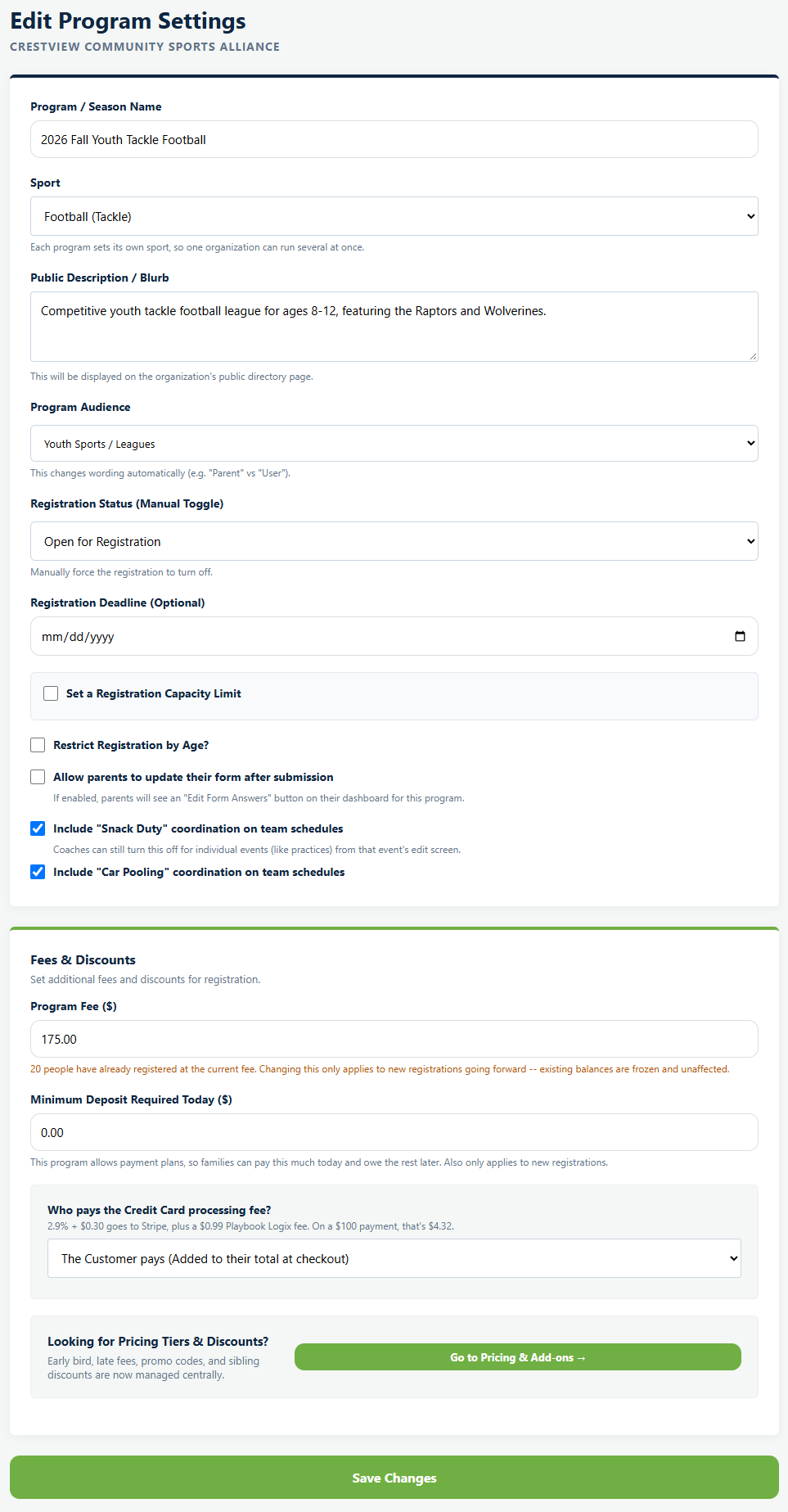
- Program name, sport and public description
- Registration status, open or closed
- Registration deadline
- Set a Registration Capacity Limit, and what counts toward it
- Restrict Registration by Age, and the birthday window
- Whether families can edit their form answers after submitting
- Whether snack duty and carpools appear on events
- Program audience
Nothing here is risky. Raising a cap, tightening an age window or closing registration are all normal mid-season moves.
What is frozen once somebody has registered
You do not have to take this on trust, because the page says it to you at the moment it matters. Under the fee field, a program with registrations shows a line reading that twenty people have already registered at the current fee, that changing it only applies to new registrations going forward, and that existing balances are frozen and unaffected. The count is your real one.
It is the right behavior. A family who paid $85 in June should not quietly start owing $95 because you raised the fee in August. It does mean that if you raise a fee and want everybody on the new number, you have to handle the existing registrations yourself.
The same freezing applies to discounts and add-ons. A promo code's value is captured at the moment it is used, so editing the code later does not reach back into registrations that already used it.
Your registration form behaves the same way in spirit. Changing a question after submissions have arrived leaves you with answers in two different shapes, which is covered in building your registration form.
What can never be changed
- The program type. Camp / Clinic, Single Team or League / Season. The create page says the choice is permanent at the time you make it.
- How registrations route. Whether players land in a holding pool for drafting or go straight onto a team follows from the type, so it is fixed with it.
- Whether the program charges at all. A free program cannot later be turned into a paid one.
- Payment plans. Whether families can pay in installments, how often, and how many, are all set at creation.
- Whether add-ons must be bought upfront.
The first two catch people most. If you set up a Single Team and then realize you are running a league, you need a new program rather than a setting.
If you got a permanent setting wrong
There is no repair, so the practical route is a new program set up correctly, then moving people across. That means re-registering them, which is real work and worth doing early rather than in week six.
If nobody has registered yet, it is much simpler: a program with zero registrations can be deleted outright. Once even one family is in, the delete option disappears and archiving is all you have. See how to end a season.
Changing pricing tiers and discounts
Early bird pricing, late fees, promo codes and sibling discounts are not on this screen. The page tells you so and links onward: a panel headed Looking for Pricing Tiers & Discounts? notes they are now managed centrally, with a Go to Pricing & Add-ons button.
All of them can be changed at any time, subject to the same freezing rule: whatever a family was already charged stays charged.
See setting registration fees and discount codes and sibling discounts.
Common questions
Can I change the registration fee after people have signed up?
How do I make a fee increase apply to everyone?
Can I change a program from a Single Team to a League?
Can I turn on payment plans later?
What can I safely change mid season?
Last updated September 22, 2026.
Ready to run your season on this?
Playbook Logix is free to start, and no credit card is needed.