
Help Center
How to use the Master Data Grid
What you will learn
- What the fixed columns are, and where the rest come from
- Why the grid is per program rather than club wide
- How to show only the columns a task needs
- The two things you can do from the grid that are hard to find elsewhere
Takes about 5 minutes.
The Master Data Grid puts every registration in a program on one row, including the answers to your own form questions. It is where most questions about your season get answered.
Open it from a program on your dashboard. Where the submissions screen shows you money, the grid shows you everything else.
Before you start
- A program with registrations in it
What the columns are
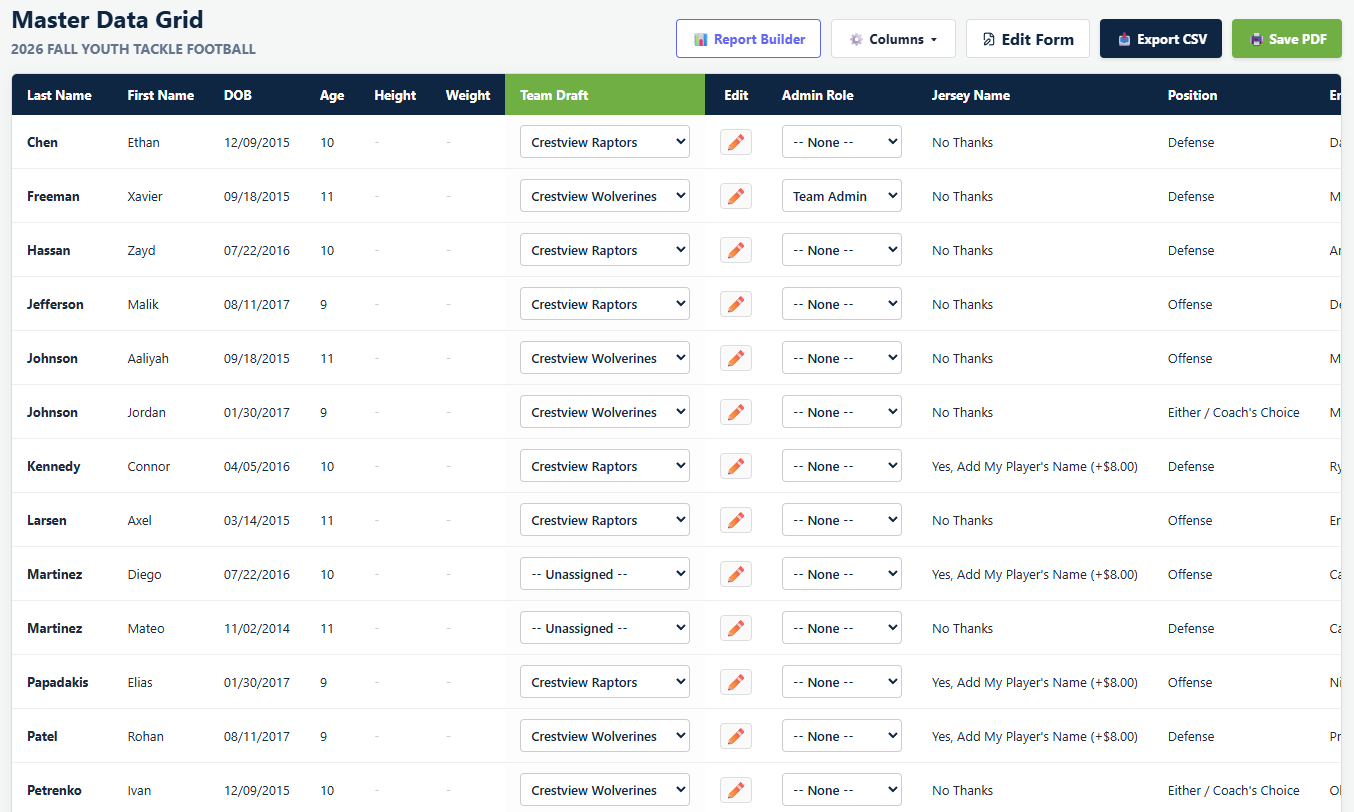
The left-hand columns are the same for every program, because they come from the player record rather than your form.
- Last Name and First Name
- DOB and Age, worked out from it
- Height and Weight, where recorded
- Team Draft, the green column, a dropdown per player
- Edit, which opens that family's form answers
- Admin Role
Everything to the right of those is yours: one column for every question on your registration form, in the order you built them.
That is the part people underestimate. If you asked for a shirt size, there is a shirt size column. If you asked which school they attend, there is a school column, and you can sort your teams by it.
Showing only the columns you need
A form with fifteen questions makes a grid with fifteen extra columns, and most tasks need three of them. The Columns menu in the toolbar turns individual columns off.
Drafting from the grid
The green Team Draft column is how players get onto teams in a league program. Each row has a dropdown, and choosing a team moves that player onto it.
This surprises people, because it is not on the roster page and not on the submissions screen, which is where most people look first. See drafting players onto teams.
Fixing an answer
The Edit column opens a family's form answers so you can correct them. Useful for the parent who typed their phone number into the emergency contact field, which happens every season.
Editing answers here does not change anything financial. The invoice was frozen at checkout and stays frozen. See what you can change after registration opens.
What the grid is good for
- The uniform order, once you have hidden everything except name and size
- Working out who is missing a physical, by comparing against what has been uploaded
- Sorting players by school, ability or anything else you asked about, before you draft
- The contact list you hand to a coach
- Any question starting "how many of them said"
What happens next
Narrowing it down is the other half. See filtering the grid and saving a report, then exporting your data.
Common questions
Where do I find the Master Data Grid?
Why does my grid have so many columns?
Can I fix a parent's answer from the grid?
Why can I not find where to assign players to teams?
Does the grid include players who cancelled?
Last updated September 22, 2026.
Ready to run your season on this?
Playbook Logix is free to start, and no credit card is needed.