
Help Center
How to filter the grid and save a report
What you will learn
- Build a condition from a field, an operator and a value
- Filter on the money, not just the form answers
- The six operators, and why is empty is the useful one
- Why several conditions always mean AND
- Save a filter so you never build it twice
Takes about 5 minutes.
Learn how to narrow the Master Data Grid down with the Report Builder, and how to save a filter under a name so the same question takes one click next season.
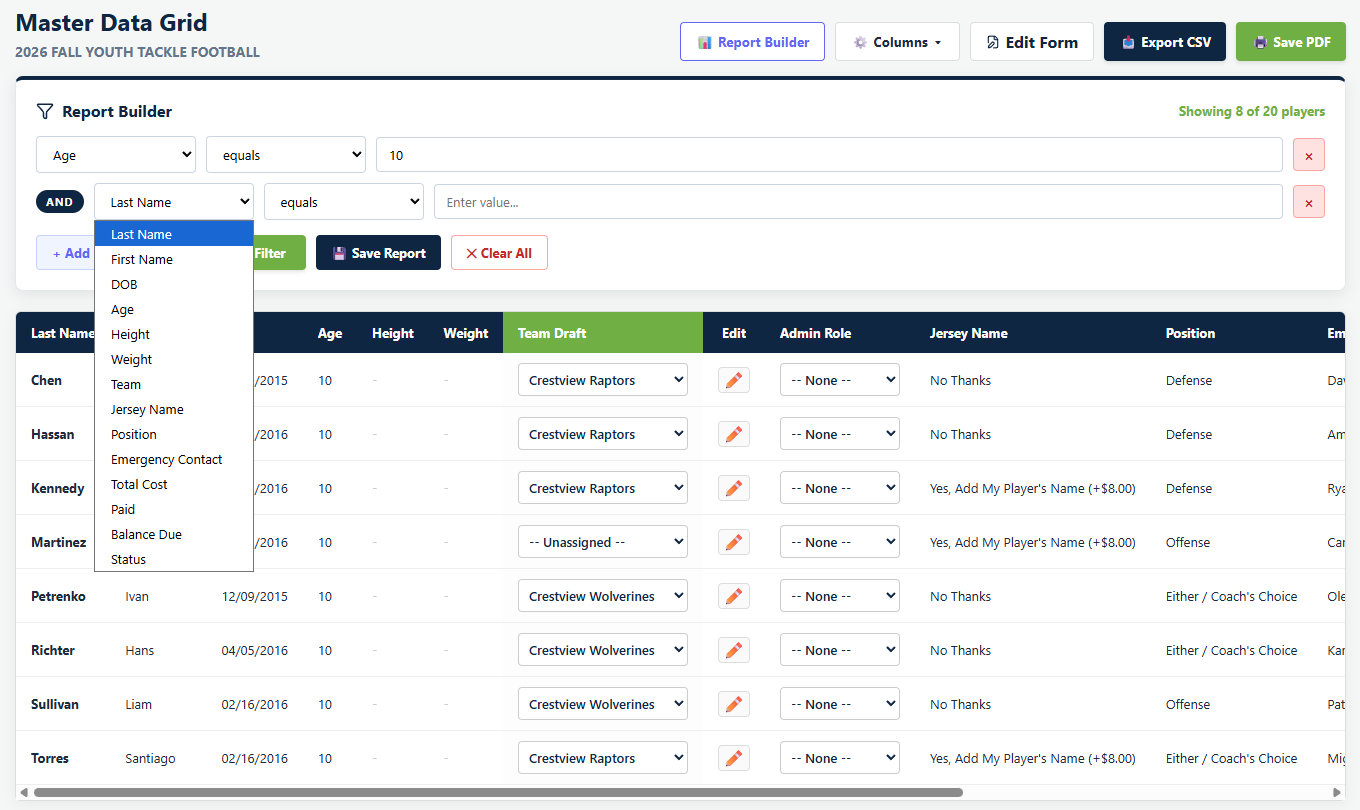
Report Builder in the grid toolbar opens a panel above the table. It is a filter rather than a separate report screen, which is the right way to think about it: you are hiding rows, not generating a document.
Before you start
- A program with registrations in it
Building a condition
+ Add Condition gives you a row with three parts: which column, how to compare, and what to compare against.
The field list covers every column in the grid, including your own form questions, so anything you asked at registration is something you can filter on.
It also covers the money. Total Cost, Paid, Balance Due and Status are all filterable, alongside Team. That is what turns "everybody who still owes something" from a chore into a saved report.
Six operators are available.
- equals, an exact match
- contains, the value appears anywhere in the cell
- starts with
- greater than and less than, for numbers
- is empty, which finds who did not answer
Apply Filter runs it, and a count appears in the corner of the panel reading something like "Showing 8 of 20 players". That number is worth glancing at, because it is the only thing on screen telling you the grid is filtered at all.
Several conditions together
When you genuinely need an either-or answer, run it as two filters and export each, or filter on something the two have in common. It is a limitation worth knowing before you spend ten minutes trying to express it.
Saving a report
Save Report asks for a name and stores the conditions under it. Saved reports appear as chips at the top of the panel; click one to load its filter, or use the small cross to delete it.
This is the part that earns its keep in year two. "Missing physical", "Needs a large shirt", "Nobody has paid" are all questions you will ask again, and rebuilding the same three conditions every August is exactly the kind of small waste nobody notices.
Clearing up
Clear All removes the conditions and shows every row again. Worth doing before you walk away from the screen, because a filtered grid looks exactly like a grid with fewer people in it, and the count is the only thing saying otherwise.
What happens next
A filtered grid exports as a filtered file, which is the whole point. See exporting your data.
Common questions
How do I filter the Master Data Grid?
Can I filter on my own registration questions?
Do multiple conditions use AND or OR?
How do I find people who did not answer a question?
Can other admins see my saved reports?
Last updated September 22, 2026.
Ready to run your season on this?
Playbook Logix is free to start, and no credit card is needed.