
Help Center
How to export your data
What you will learn
- Why the export always matches the screen
- Export a CSV that opens in any spreadsheet
- A worked example: the uniform order in four steps
- What to trim before sending a file to anybody
Takes about 5 minutes.
Learn how to get a roster or registration list out of Playbook Logix as a spreadsheet, how to print a clean copy, and why the file you get matches the screen exactly.
Before you start
- A program with registrations in it
The rule that explains everything
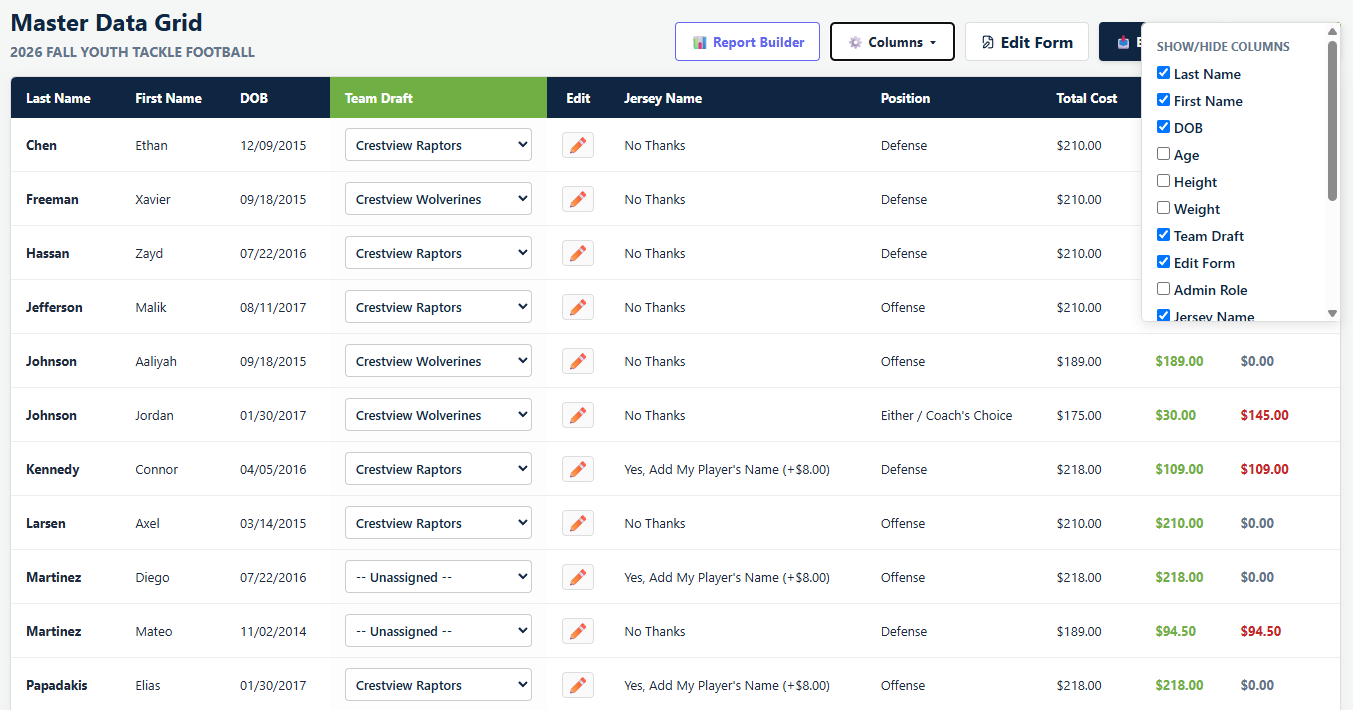
Once that clicks, the whole thing gets simpler. Producing a file with three columns and eleven rows is not an export option, it is a grid with three columns and eleven rows showing.
Exporting a spreadsheet
Export CSV in the toolbar downloads the grid as a CSV file, which opens in Excel, Numbers, Google Sheets or anything else that reads a spreadsheet.
Dropdown columns export their label rather than an internal value, so the Team Draft column comes out as team names, which is what you want.
A worked example
The uniform order is the usual one, and it shows the pattern.
- Open the grid for the program.
- Use Columns to hide everything except first name, last name and shirt size.
- If you only want one team, add a filter condition for it.
- Export CSV.
What lands is a three column file you can send straight to the supplier, rather than a forty column file carrying medical notes and phone numbers that you then have to clean up by hand.
Printing
Save PDF opens your browser's print dialog rather than building a file, so from there you choose Save as PDF or print it. The grid's toolbar and filter panel are left out of the printed copy.
Useful for the check-in sheet a coach carries to the first session, which is a case where paper genuinely beats a phone.
Attendance
Attendance has its own report rather than living in the grid, because it is per team and per event instead of per registration. See RSVPs and attendance.
Before you send it anywhere
An export is a copy of your families' personal details that has left the system, and from that point it is yours to look after. Two habits are worth having.
- Trim it to what the recipient needs. A supplier needs sizes, not dates of birth. A coach needs contact details for their own team, not the whole league.
- Delete it when you are done. The spreadsheet in somebody's downloads folder is the copy nobody is protecting, and it outlives the reason it was made.
See what records to keep.
Common questions
How do I export a youth sports roster to Excel?
Why does my export have columns I did not want?
Does the export include rows I filtered out?
How do I print a roster?
Where do I export attendance?
Last updated September 23, 2026.
Ready to run your season on this?
Playbook Logix is free to start, and no credit card is needed.