
Help Center
How to fill in your organization settings
What you will learn
- Which details are public and which are not
- What the custom URL slug is for
- Why there is no sport field, and where sports come from
- What else shares this page
Takes about 10 minutes.
Learn where your organization name, location, description, phone and website live in Playbook Logix, and which of them families actually see.
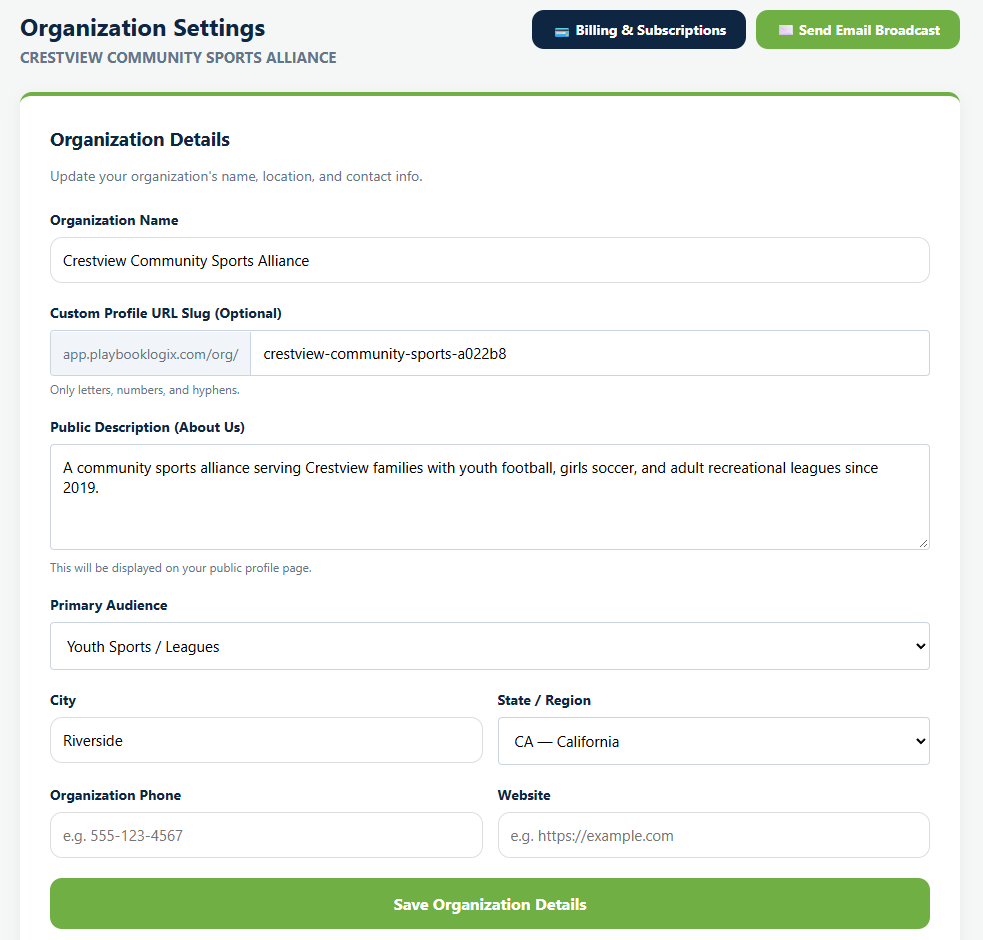
Open Organization Settings for your club. The first panel is Organization Details, and most of what is in it ends up on your public page rather than staying private.
Before you start
- An organization you own or administer
The fields, and who sees them
Organization Name is what families see everywhere, so use the name they would recognize rather than a legal entity name. Crestview Community Sports Alliance, not Crestview CSA Inc.
Custom Profile URL Slug sets the address of your public page. Letters, numbers and hyphens only. It is optional, and worth setting, because it is the difference between a link somebody can read aloud and one they cannot.
Public Description (About Us) appears on your public page under your name. The field's own hint says so. Two or three sentences is plenty, and it is the one place to say who you are for.
Primary Audience, youth or adult, changes wording around the product. It is the setting behind whether the app says "parent" or "user" to somebody.
City and State / Region show on your public page and are how somebody tells you apart from the three other clubs with similar names.
Organization Phone and Website are optional, and worth filling in if you want families contacting you somewhere other than a coach's personal number.
There is no sport here
Deliberately. One organization can run baseball, softball, tennis and football at the same time, so the sport belongs to each program instead.
Your public page still lists the sports you run. They are worked out from the programs currently open for registration rather than stored anywhere, then deduplicated and sorted. Add a soccer program and soccer appears; close or archive it and soccer goes. Nothing to maintain, and nothing that can go stale.
Your logo
The logo is not on this form. It has its own Logo button on the organization card on your dashboard, and once uploaded it shows on your public page and beside your organization throughout the app.
A square image works best, since that is how it is displayed almost everywhere. A wide banner gets cropped and usually loses half its wording.
What else lives on this page
Organization Settings carries more than the details panel.
- Organization Admins, covered in adding organization admins.
- Accepted Payment Methods, where Venmo, Cash App, Zelle and PayPal details go. See accepting cash, checks and Venmo.
- Your Stripe connection, for taking cards. See connecting Stripe.
What happens next
Everything on the details panel feeds your public page, so it is worth looking at the result. See your public organization page.
Common questions
What name should I use for my organization?
Why is there no sport on my organization?
Where does the public description appear?
What does Primary Audience change?
What shape should my logo be?
Last updated September 22, 2026.
Ready to run your season on this?
Playbook Logix is free to start, and no credit card is needed.