
Help Center
Your public organization page
What you will learn
- What the page shows, and what it never shows
- Why a closed program disappears from it
- Setting a web address you can print
- Where to find the link and how to share it
Takes about 5 minutes.
Every organization gets a public page listing the programs it currently has open. How to set its address, what appears on it, and what deliberately never does.
It is the one link you can give somebody who has not registered for anything and does not have an account. Useful on a flyer, in a Facebook post, or as the answer to "where do I sign up".
Before you start
- An organization with at least one open program
What is on it
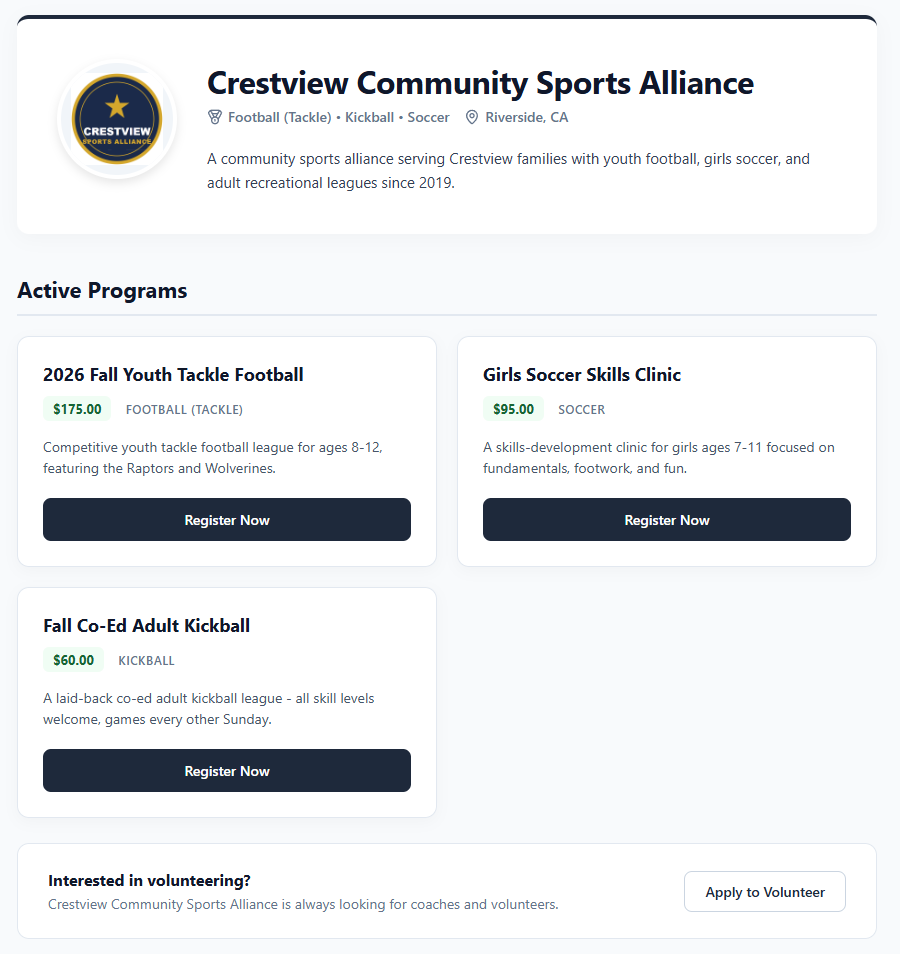
- Your logo, name, location and description
- The sports you run, worked out from your open programs
- Every program currently open, with its sport, fee and description
- A Register Now button on each one
- An invitation to apply as a coach or volunteer
What is not on it
Archived programs are not on it either, and neither are programs you have closed. Only what is open for registration right now.
That last point is the one worth remembering, because it means the page keeps itself honest. Close a program and it stops being advertised the same moment it stops accepting people.
Setting the address
By default the page has a working but unmemorable address. Set Custom Profile URL Slug in Organization Settings and it becomes something you can print.
The address is app.playbooklogix.com/org/ followed by your slug, so a slug of crestview-sports gives you app.playbooklogix.com/org/crestview-sports. Letters, numbers and hyphens only.
Finding and sharing the link
Your organization card on the dashboard has a Copy Link button next to View Profile. Copy Link gives you the full address including the domain, which is what you want when pasting it somewhere outside the app.
View Profile opens the page as a visitor sees it. Worth doing once after you set your description, because it is the only way to find out that the sentence you wrote reads oddly.
Using it well
- Put it wherever you currently put a phone number. It answers more questions than a phone number and does it at eleven at night.
- Give it to people who are not ready yet. A direct registration link is for somebody who has decided; this is for somebody still deciding.
- Keep the description current. It is the only part that does not update itself, so it is the only part that can be wrong.
What happens next
For sending somebody straight into one program rather than to the list, see sharing your registration link.
For the fields behind what appears here, see organization settings.
Common questions
Do families need an account to see my organization page?
Are any player names on my public page?
Why is one of my programs missing from the page?
How do I get a nicer web address?
Can I change the slug later?
Last updated September 22, 2026.
Ready to run your season on this?
Playbook Logix is free to start, and no credit card is needed.