
Help Center
How to take tournament entries and payments from teams
What you will learn
- Taking entries and fees from teams, not families
- Why a coach never enters a roster
- Deciding who is in the bracket, paid or not
- Sending the entered teams into the builder in one click
- What unticking a team does, and what it does not
Takes about 6 minutes.
Learn how to take tournament entries and payments from teams the same way you take registrations from families, then send the teams that entered straight into the bracket builder.
A tournament is the one event where the thing signing up is a team rather than a child. The coach of a visiting club does not want to add twelve players to your system, and you do not want them to. They want to put a name in, pay the entry fee, and find out which pool they are in. That is what this does.
Before you start
- An organization with payments set up, if you are charging an entry fee
Make the program a tournament
A tournament is a program type, alongside a league, a camp and a single team. Pick it when you create the program and the rest of the program setup is the same as any other: your fee, whether payments are on, a minimum deposit, your own form fields, add-ons and discount codes.
What a coach does
You share the registration link exactly as you would for a season. Anybody who opens it while logged out is asked to sign in or create an account first, then lands back where they were going.
- They add their team. A team is a name, optionally a club and a sport, and nothing else. No roster, no birthdays, no players at all. The first one is added from the entry page itself; after that Your Teams appears in their sidebar.
- They pick which team is entering, fill in whatever form fields you added, choose add-ons and enter a discount code if they have one.
- They pay, through the same checkout a parent uses, with the same deposit rules, the same receipt and the same running balance.
A coach keeps their teams between tournaments the way a parent keeps their children. They add Summerville Storm 14U once and enter it in every tournament you run after that.
Seeing who has entered
Open the program and click Entered Teams. Every team that has entered is listed with who entered it, what it owes and whether it has paid.
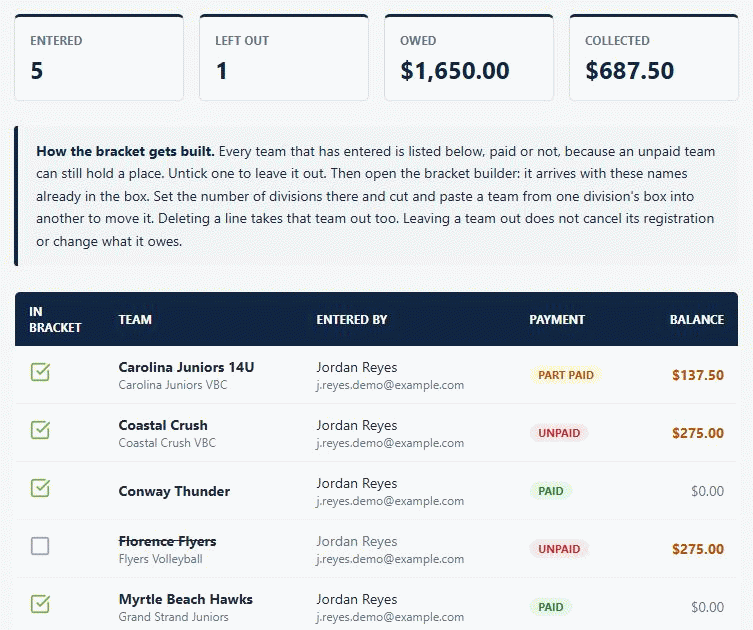
Payment does not decide who is in the bracket. Every team that entered starts ticked, paid or not, because a team that is still settling up on the Friday night before a Saturday tournament still needs a place in the draw. Untick one to leave it out.
From entries to a bracket
The bracket builder is the same free one on our website, and it does not need to be told the teams twice. From Entered Teams, click Open the bracket builder. It opens with your tournament name, your sport, and every ticked team already in the box.
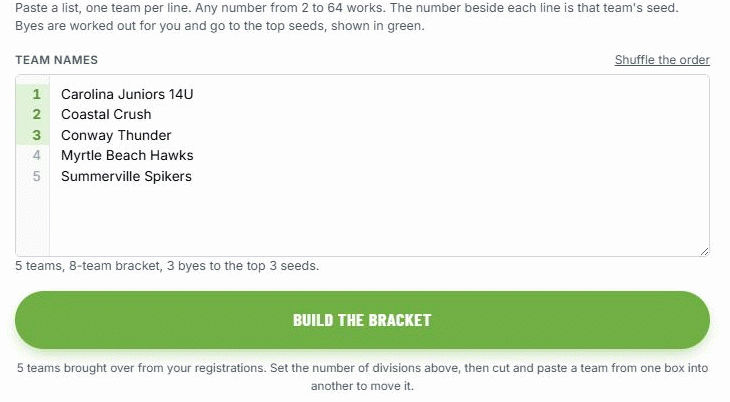
From there the builder works the way it always has:
- Set how many divisions you need, and you get that many boxes.
- Move a team between divisions by cutting its name out of one box and pasting it into another.
- Take a team out by deleting its line.
- Add a team that never registered by typing it in, for the club that paid at the door.
- Build them all at once, and they save to your account as one tournament with tabs between the divisions.
There is also a Copy team names button if you would rather paste them in yourself, or keep them for a sheet of paper.
A tournament team is never a player
A tournament entry has no child attached to it anywhere in the system, and the places that would normally offer to put a registration on a roster refuse it and say why. Rosters hold players; a tournament team is a name on a bracket.
This is also why nothing about a tournament team is sensitive. The public bracket page publishes team names, scores, times and field numbers, which is what is already on a bracket taped to a wall at the venue, and there is no player in the data to publish even by accident.
What happens next
See running several divisions for building a whole weekend at once, pool play for pools feeding a Gold and Silver bracket, and sharing your bracket for the link you give parents.
Common questions
How do teams sign up for a tournament instead of players?
Does a coach have to enter a roster?
Can one club enter more than one team?
Does paying put a team in the bracket automatically?
If I untick a team, is it cancelled or refunded?
How do the teams get into the bracket?
How do I split the teams into age groups?
Can I add a team that never registered?
What happens to entries if I rebuild the bracket?
Can a tournament team be put on a roster?
Ready to run your season on this?
Playbook Logix is free to start, and no credit card is needed.