
Help Center
How to share your bracket
What you will learn
- The one link that answers everything, for everybody
- Preview it privately before it goes public
- What the page never publishes, including your own email
- Why the address is fixed the moment you publish
Takes about 5 minutes.
Learn how to give every parent at your tournament one link that needs no account, updates as you enter scores, and works on a phone at a ballfield.
This is the part of a tournament that replaces the most work. One link answers who plays next, at what time, on which field, for a hundred people, all weekend.
Before you start
- A tournament saved in your account, with its dates and location
The public page
A published tournament gets an address of the form app.playbooklogix.com/t/ followed by its slug. No account, no login, no app to install.
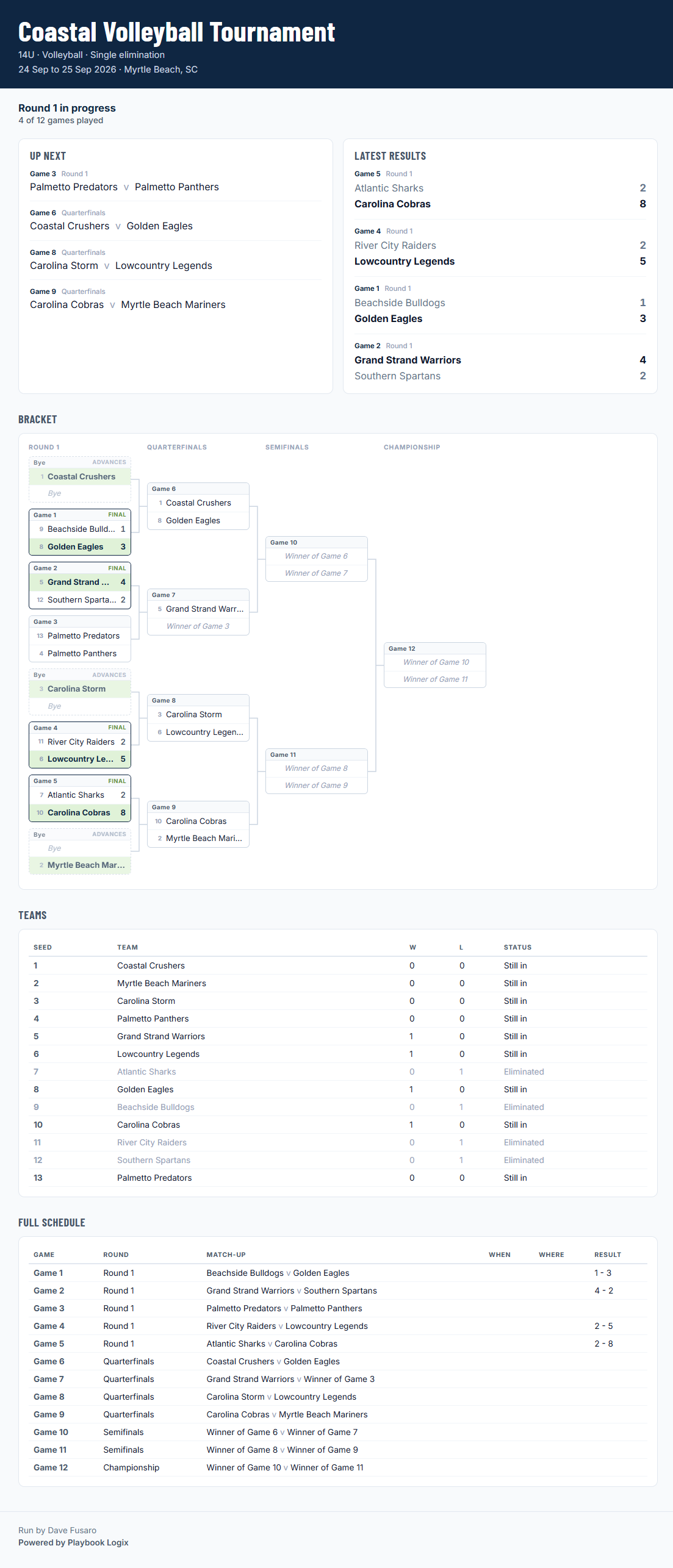
It carries more than the bracket, which is what makes it worth refreshing rather than just worth looking at once.
- A progress line, reading something like round one in progress, four of twelve games played.
- Up Next, the games about to be played.
- Latest Results, the most recent scores with the winner in bold.
- The bracket, with byes marked, finished games showing their score, and winners carried forward.
- A team table, listing every team with its seed, its wins and losses, and whether it is still in or eliminated.
- The full schedule, every game with its round, its matchup and its result.
- Your announcement, at the top, if you wrote one.
The Up Next panel is the one parents actually use. It answers "when does my kid play next" without anybody having to read a bracket, which most people cannot do at a glance.
Previewing before you publish
You can get a private preview link before the tournament is public. It works in any state, which is what makes it useful for checking the page on a phone before anybody else sees it.
The published address only works once the tournament is actually published, so nothing leaks early by somebody guessing a name.
What it never publishes
Your organizer name shows only if you filled that field in. Leave it blank and it does not appear.
What the page does publish is team names, scores, times and field numbers: the same information as a bracket taped to a wall at the venue and read out over a PA all weekend.
The address does not change
So pick the name before you publish rather than after.
Taking it down
A tournament that is not published resolves for nobody. Somebody following an old link is told it may have expired or been taken down, which is the same answer a wrong guess gets, so no link tells anybody whether a tournament exists.
Getting the most from it
- Share it before the weekend, not on the morning. Parents plan around a schedule they can see on Thursday.
- Use the announcement for anything that changes. A rain delay posted once beats a hundred replies to a group text.
- Enter scores promptly. The link is only worth refreshing if it is ahead of the rumour going round the car park.
- Give it to the visiting clubs too. They have no account and need none, which is exactly the point.
What happens next
See entering scores for keeping it current, and running a tournament for everything before the first game.
Common questions
Do parents need an account to see the bracket?
What is actually on the public tournament page?
Can I check the page before it goes public?
Is my email address published on the tournament page?
Are any players named on a public tournament page?
Can I change the tournament web address?
Last updated September 23, 2026.
Ready to run your season on this?
Playbook Logix is free to start, and no credit card is needed.