
Help Center
How a parent signs up to volunteer
What you will learn
- Why a parent on the roster still cannot claim a slot
- What each of the three unapproved states means
- How signing up works, and where commitments are listed
- Canceling, and who else can free up a slot
Takes about 2 minutes.
Learn what a parent has to do before they can claim a volunteer slot in Playbook Logix, how signing up works, where their commitments are listed, and how to back out when something comes up.
There is one step in here that surprises people, so it goes first.
Before you start
- Volunteer jobs posted on upcoming events
- At least one approved volunteer in the organization
Approval comes before signing up
This is intentional. Volunteer jobs put an adult in a position of some responsibility, and plenty of organizations have their own screening before that happens. Playbook Logix makes that approval a step rather than an assumption.
It also means that if you post jobs and nobody signs up, the first thing to check is whether anybody is actually approved yet.
What a parent sees instead of a button
Where an approved volunteer sees Sign Up, somebody who is not approved sees one of three things, depending on where they stand.
- Apply to Volunteer, a link to the staff application form, for somebody who has never applied.
- Request Pending, for somebody who applied and is waiting on an administrator.
- Not Approved, where an application was turned down.
The first of those is the useful one. A parent who wants to help can start the process from the exact moment they wanted to help, rather than hitting a dead end and forgetting about it.
Approving applications happens on Staff and Volunteer Management. See adding coaches and volunteers.
Signing up for a job
Once approved, a parent opens Volunteer Central for their team and sees the same page you do: every upcoming event, the jobs posted on each one, and how many slots are still open.
Sign Up on any job that is not full takes a slot immediately. There is nothing to confirm and no approval on the individual job, and the row switches to Signed Up with their name listed underneath so the rest of the team can see it.
A job whose slots are all taken is labeled FULL and has no button, which is the point of the counters: nobody has to ask whether a job still needs somebody.
Keeping track of what they agreed to
Everything a parent has signed up for is collected in My Volunteer Commitments, a panel near the top of Volunteer Central. Each line carries the date, the job and the event, so somebody who said yes to four things three weeks ago can see all four without scrolling through the season.
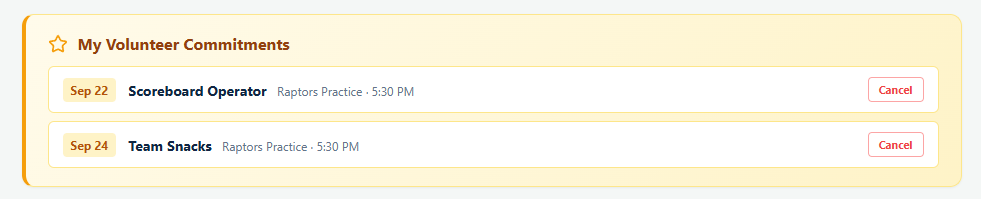
The panel only appears when there is something in it, so a parent who has not signed up for anything will not see it at all.
Canceling a signup
Cancel on a commitment gives the slot back, and there is a confirmation prompt so it does not happen by accident. The same button is on the job itself.
Coaches and managers are notified when somebody cancels, because a slot that has just opened back up is something they need to know about. The original signup is not notified, which is the right way round: a filled slot is good news that can wait, an empty one cannot.
Who else can remove somebody
A coach, manager or organization administrator can remove a volunteer from a job using the small cross next to their name. Use it when somebody tells you in person that they cannot make it, so the slot goes back into the pool where another family can see it.
What happens next
Snack duty and carpools work differently: any family on the roster can claim those without being an approved volunteer at all. See snacks and carpools.
And if slots are sitting empty, the problem is usually the wording of the job rather than the software. See how to get parents to volunteer.
Common questions
Why can a parent not sign up for a volunteer job?
How does a parent apply to volunteer?
Does a coach have to approve each individual signup?
Where does a parent see what they signed up for?
What happens when somebody cancels?
Last updated September 21, 2026.
Ready to run your season on this?
Playbook Logix is free to start, and no credit card is needed.