
Help Center
How to collect physicals and birth certificates
What you will learn
- See what families have uploaded, and for which player
- Work out who is still missing something
- Ask in a way that actually produces uploads
- Decide what to keep, and for how long
Takes about 5 minutes a week during signup.
Learn how families upload physicals, birth certificates and insurance details in Playbook Logix, where those arrive, and how to work out who is still missing something.
This is the opposite direction from sharing a handbook. Here the family uploads and you review. A parent does it from their own dashboard, and it lands on Review Player Documents.
Before you start
- A team with registered players
- A decision about which documents you genuinely need
What arrives
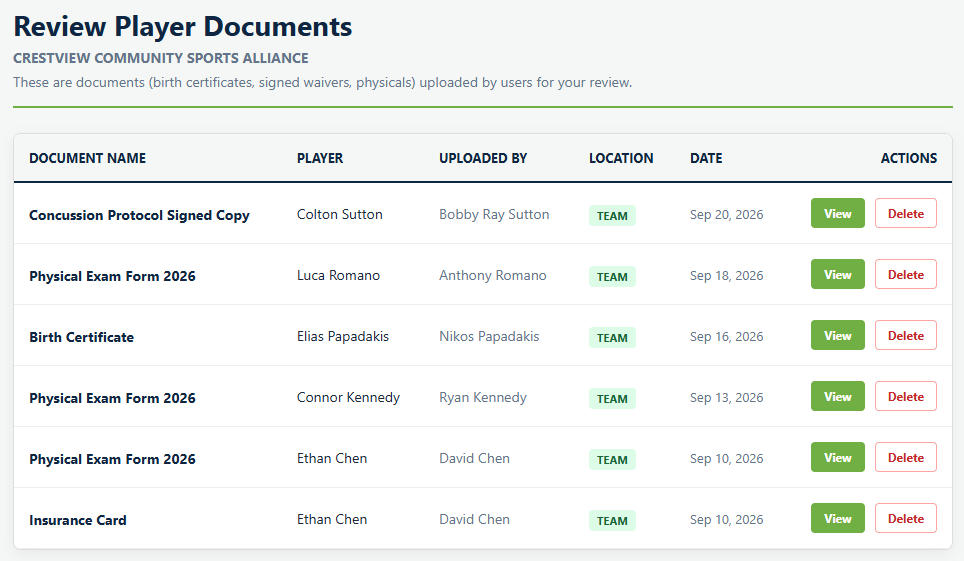
Each row carries the document name, the player it belongs to, the parent who uploaded it, which team, and the date. A player can have several documents and the same parent can appear more than once, which is normal for a family with two children or a physical plus an insurance card.
View opens the file. Delete removes it.
Working out who is missing
This is the honest limitation. The screen shows you what has arrived, not what has not. There is no checklist per player and nothing marks a registration incomplete for want of a physical.
So the practical approach is to compare against your roster. Export the team from the Master Data Grid, sit it beside this list, and the gaps are whoever appears in one and not the other.
Asking in a way that works
Most of the difficulty with player documents is not the software, it is that photographing a form and uploading it is the kind of task that stays at the bottom of a list for three weeks. A few things help.
- Ask at registration, not after. A family filling in a form is already in the right frame of mind. A family three weeks into the season is not.
- Give a deadline attached to something real. "Before the first game" beats "as soon as possible", because one of those is a date.
- Say that a phone photo is fine, if it is. Plenty of people assume they need a scanner and quietly do nothing.
- Chase in one batch. Work out the gaps once a week and message those families, rather than reminding everybody repeatedly and training the compliant ones to ignore you.
Keep only what you need
For the wider question of what to ask for in the first place, see what to collect on a registration form.
The other direction
Files you provide to families work the other way round and live on their own screen. See sharing documents with families.
Common questions
Where do documents families upload appear?
How do I see who has not uploaded anything yet?
Are uploaded documents publicly accessible?
How do I get families to actually upload things?
Should I keep these documents after the season?
Last updated September 22, 2026.
Ready to run your season on this?
Playbook Logix is free to start, and no credit card is needed.