
Help Center
How to collect digital waivers
What you will learn
- Write a policy and publish it to your whole organization
- See exactly what a family goes through to sign
- Read the compliance report, including the three statuses
- Chase the unsigned, and record a paper signature properly
Takes about 10 minutes.
Learn how to write a waiver or policy in Playbook Logix, collect signatures from families online, see at a glance who has not signed, and record a signature somebody gave you on paper.
Open Waivers for your organization. The page is headed Manage Waivers & Policies, and one organization's policies apply across all of its programs and teams.
Before you start
- The wording you intend to use, checked by somebody qualified if it is a real release
- An organization with families registered in it
Write it
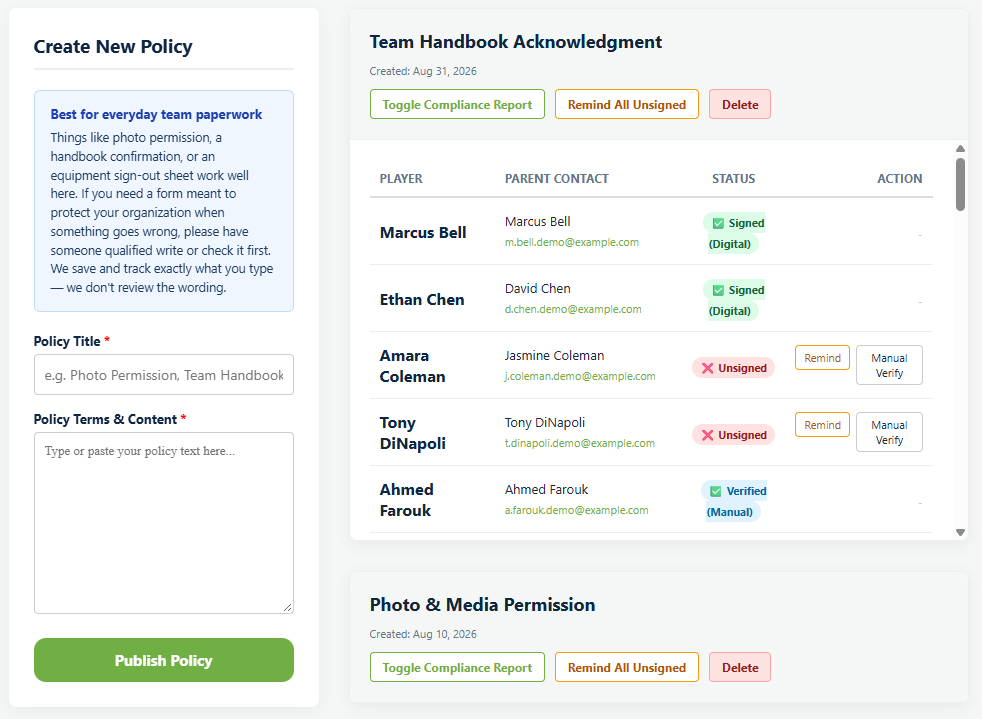
Create New Policy takes a Policy Title and Policy Terms & Content. You type or paste the words; there is no file to upload, because the text has to be readable inside the app for somebody to sign it.
There is a further reason not to write your own release from scratch. Waivers are governed by state law, several states limit what a parent can waive on behalf of a minor, and a clause that works in one state can be unenforceable in the next one over. That is a question for somebody with a license, not for software.
Families sign
Once published, anybody with an unsigned policy sees a prompt on their own dashboard. They cannot miss it and you do not have to send it.

Review & Sign opens the full text. They read it, type their name as an electronic signature, and press I Agree & Sign Document.
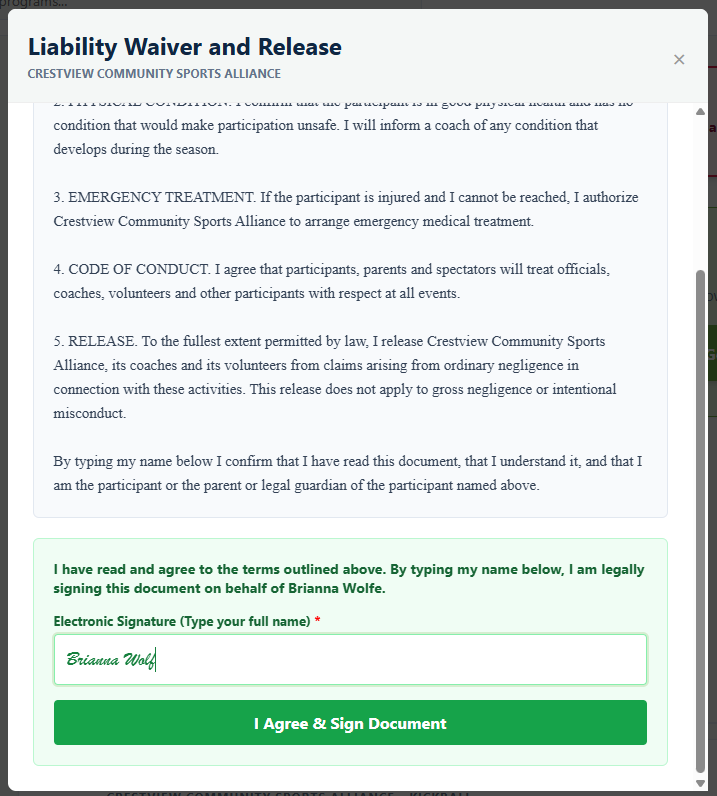
The confirmation above the box states what typing the name means and who it is being signed on behalf of. That specificity is the point: a signature attached to a named player, with the exact text they were shown, recorded at the moment they agreed.
See who has not signed
Toggle Compliance Report opens the list for a policy: every player, their parent's contact details, and a status.
- Signed (Digital), signed in the app.
- Unsigned, outstanding.
- Verified (Manual), signed on paper and recorded by you.
The three stay distinguishable, which matters for a record you might one day have to produce. A manual verification is you saying you saw a signature; a digital one is the system saying it captured one.
Chase the rest
Remind on a row emails that family. Remind All Unsigned does everybody outstanding on that policy at once.
Recording a paper signature
Manual Verify marks somebody as having signed offline. Use it for the grandparent who filled in a form at the first practice, or a family without reliable internet.
Keep the paper. The record says a human verified it, which is worth exactly as much as the paper behind it.
Deleting a policy
What happens next
Signed policies are one half of season paperwork. The other half is what families send you. See collecting physicals and birth certificates, and what a waiver should say before you write one.
Common questions
Do I upload a waiver as a PDF?
How does a parent sign?
What is the difference between Signed and Verified?
Can I use this as a real liability waiver?
What if I need to change the wording?
Last updated September 21, 2026.
Ready to run your season on this?
Playbook Logix is free to start, and no credit card is needed.